
If you searched for “lalal ai reviews 2026,” the short answer is this: LALAL.AI is one of the more convenient AI vocal remover and stem separation tools for creators who want fast results without learning audio engineering. It is not magic, and it does not make every track sound studio-perfect.
Across LALAL.AI user reviews, community comments, YouTube demos, and review platforms such as Trustpilot and Product Hunt, the same pattern appears: people like the speed and simplicity, but they complain when complex songs produce artifacts, weak bass separation, or imperfect vocal isolation.
Splitthetrack may earn a commission if you buy through our affiliate link, at no extra cost to you. You can try the tool through the official LALAL.AI website and compare the free Starter option before paying.
Official website · Latest pricing & offers
LALAL.AI Reviews 2026: Quick Verdict
LALAL.AI reviews 2026 are mostly positive when expectations are realistic. The tool is especially relevant for people who need fast stem separation and simple workflows, not people who expect every extraction to be flawless.
The best results tend to come from clean source files, less crowded mixes, and tasks where “usable” is more important than “perfect.” If you are making practice tracks, quick edits, social clips, DJ ideas, or remix sketches, LALAL.AI can save time.
The main complaints are also predictable. Some users report incomplete separation, low-end artifacts, and frustration when a paid result does not match the preview or expectation. That does not make the product bad, but it does mean you should test your own material before buying a plan.
Who this tool is for
LALAL.AI is for creators, musicians, editors, DJs, remixers, producers, podcasters, and beginners who want a straightforward way to remove vocals, isolate instruments, clean voice recordings, or split stems.
It is particularly useful if you do not want to install complex audio software or manually process tracks inside a DAW. The official site offers web-style access plus desktop, mobile, VST, and API options, which makes it more flexible than a basic browser-only vocal remover.
In practical terms, LALAL.AI reviews 2026 suggest it fits users who value speed over deep control. If you need a quick acapella, instrumental, drum stem, bass stem, guitar stem, or vocal cleanup, it is worth testing.
Bottom-line recommendation
LALAL.AI is worth considering in 2026 if you want a fast, beginner-friendly AI vocal remover and stem splitter. It is not the right choice if your work demands guaranteed clean stems from dense commercial mixes every time.
My recommendation is simple: try the Starter option first with the exact kind of audio you plan to process. If the previews and outputs are good enough for your use case, the Lite or Pro plan may make sense.
For skeptical buyers reading LALAL.AI reviews 2026, the fair verdict is: strong convenience, good average usefulness, variable quality, and a buying decision that should depend on your own tracks.
What LALAL.AI Does and Why People Use It
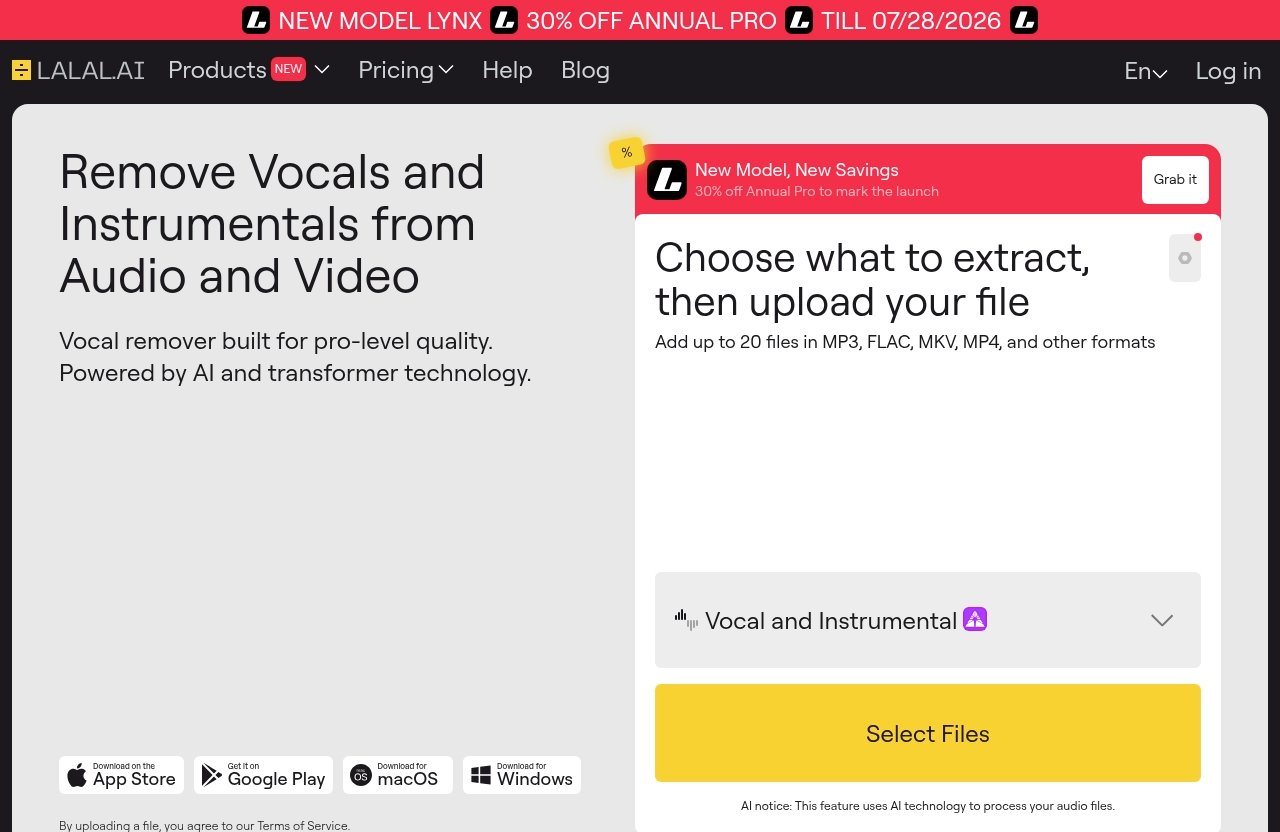
LALAL.AI is officially described as the LALAL.AI AI Vocal Remover & Instrumental Isolator. The homepage states that the tool is powered by AI and transformer technology.
That matters because the product is not only a simple vocal remover. It is a broader suite for separating, cleaning, changing, cloning, and processing voices and music files.
Most LALAL.AI reviews 2026 focus on vocal removal because that is the most common use case. But the full product is more useful when you think of it as a fast audio separation toolkit.
Vocal remover vs stem splitter
The LALAL.AI vocal remover is designed to remove vocals and instrumentals from music tracks, audio clips, or video files. In simple terms, it helps create an instrumental version or isolate the vocal part.
The LALAL.AI stem splitter goes further. According to the official product categories, it can extract vocals, instrumental, drums, bass, guitar, synth, string, and wind instruments.
That distinction matters for buying. If you only need karaoke-style instrumentals, the vocal remover may be enough. If you produce remixes, practice parts, or edit music more seriously, the stem splitter is the more relevant feature.
Other tools in the LALAL.AI suite
The official LALAL.AI suite includes several audio tools beyond vocal and instrumental separation:
| Tool | Official purpose |
|---|---|
| Vocal Remover | Remove vocals and instrumentals from music, audio, or video |
| Stem Splitter | Extract vocals, instrumental, drums, bass, guitar, synth, string, and wind instruments |
| Voice Cleaner | Remove background music, vocal plosives, mic rumble, and unwanted noises |
| Voice Changer | Transform and change your voice in music, audio recordings, and video files |
| Voice Cloner | Build a personalized AI voice model from your own recordings and samples |
| Echo & Reverb Remover | Remove echo and reverb from vocals, voice recordings, songs, and videos |
| Lead/Back Splitter | Separate lead and backing vocals |
This wider feature set is one reason LALAL.AI reviews 2026 often compare it to more than just karaoke makers. It overlaps with creator tools, post-production utilities, and music production workflows.
Common use cases for creators, musicians, and editors
Creators use LALAL.AI to make vocal-free backing tracks, isolate dialogue, prepare remix material, clean voice recordings, and split songs for editing. Musicians may use it to practice bass, drums, guitar, or vocal parts.
Video editors may use the voice cleaner or echo remover to improve rough audio. Producers may use the stem splitter to create starting points for remixes or arrangement study.
The key phrase is “starting point.” LALAL.AI reviews 2026 are strongest when users treat the results as useful assets that may still need editing, EQ, noise reduction, or mixing.
Real User Sentiment in 2026: What People Like
Looking across review platforms, Reddit-style discussions, Product Hunt comments, YouTube tests, and music-tech writeups, the positive sentiment is fairly consistent. Users like that LALAL.AI is quick, simple, and accessible.
These are patterns, not universal guarantees. Different reviewers test different tracks, and results can vary heavily depending on source quality, arrangement density, compression, reverb, and overlapping frequencies.
Still, LALAL.AI reviews 2026 commonly praise four things: speed, quality on suitable tracks, ease of use, and usefulness for everyday creative tasks.
Fast separation workflow
The biggest advantage is speed of workflow. You upload or process a file, choose the separation type, and get results without building a complex signal chain.
For beginners, that simplicity is a real benefit. You do not need to understand phase cancellation, spectral editing, multiband processing, or manual isolation techniques.
Several YouTube demonstrations and user comments emphasize that LALAL.AI is attractive because it removes friction. Even when the output is not perfect, getting a usable draft quickly can be valuable.
Quality on clean and moderately complex tracks
LALAL.AI performs best when the original audio is clean and the mix is not overly crowded. Songs with clear vocals, less aggressive mastering, and well-separated instruments usually produce more satisfying results.
This is where many positive LALAL.AI reviews 2026 make sense. For common creator tasks, “clean enough” is often all that is required.
However, you should not assume that one impressive demo means every song will behave the same way. Dense rock mixes, heavy reverb, distorted guitars, layered harmonies, and busy low-end arrangements can be harder for any AI separator.
Ease of use for beginners
LALAL.AI’s interface and product positioning are clearly beginner-friendly. That is one reason it appears often in discussions about the best vocal remover in 2026.
A new user can understand the main workflow quickly: pick a tool, upload audio or video, choose the stem or processing type, and evaluate the result. That matters for creators who do not want a full production course just to make an instrumental.
This beginner appeal also explains why some advanced users are more critical. They may want more controls, more transparent processing options, or deeper editing features than LALAL.AI is designed to provide.
Helpful for remixes, practice, edits, and content
For remixers, LALAL.AI can produce acapellas and instrumental parts to sketch ideas. For musicians, it can help isolate sections for practice and learning.
For editors and content creators, it can help separate a voice from background music or remove unwanted elements from a recording. The Voice Cleaner and Echo & Reverb Remover also broaden its usefulness beyond music-only tasks.
Based on LALAL.AI reviews 2026, the happiest users are usually those with practical, time-saving goals. They are not expecting the tool to replace professional multitrack sessions.
The Most Common Complaints About LALAL.AI
A fair review has to address the complaints directly. LALAL.AI complaints usually fall into four categories: imperfect separation, bass or low-end issues, pricing/value concerns, and trust or support frustrations.
These complaints are not unique to LALAL.AI. AI stem separation as a category is difficult because finished songs were not originally mixed to be separated after release.
Still, if you are deciding whether LALAL.AI is worth it, these issues matter.
Incomplete separation on some songs
The most common complaint is incomplete separation. Users may hear traces of vocals in the instrumental, backing instruments in the vocal stem, or odd smearing around harmonies and effects.
This tends to happen more often on complex songs. If a vocal shares frequencies with guitars, synths, cymbals, or reverb tails, the AI has a harder job.
That is why LALAL.AI reviews 2026 should be read with context. A user processing a clean pop vocal may be thrilled, while someone separating a dense live recording may be disappointed.
Bass or low-end artifacts
Low-end artifacts are another recurring issue in AI stem separation. Bass, kick drum, low synths, and room resonance often overlap, making them difficult to isolate cleanly.
Some users mention thin bass, muffled low-end, or residual thumps in separated stems. These issues can matter more for producers than casual users because low-end quality affects remix and mix decisions.
If bass separation is central to your workflow, test multiple tracks before paying. Do not assume the LALAL.AI stem splitter will cleanly extract every bass line from every finished song.
Pricing and value concerns
LALAL.AI pricing is another area where user sentiment is mixed. Some buyers feel the tool is worth paying for because it saves time. Others feel frustrated if their processed tracks do not meet expectations.
This is why the free Starter option is important. It gives you a way to test the basic experience before choosing a paid tier.
The value question is not simply “Is LALAL.AI cheap?” It is “Does it produce results good enough for the work you actually do?” For casual creators, the answer may be yes. For critical professional work, the answer may depend track by track.
Support, reliability, or trust concerns
Some online comments also mention support, reliability, account, or trust concerns. As with any online tool, buyers want to know whether uploads, payments, account access, and customer service feel dependable.
For safety, it is best to stay grounded. LALAL.AI is an established public product with official apps and pricing pages, but users should still review privacy terms, account settings, and payment details before uploading sensitive material.
LALAL.AI safety concerns are usually less about dramatic technical risk and more about normal buyer questions: Who handles the files? What happens to account data? Can I trust the billing page? Those are fair questions for any creator tool.
Official website · Latest pricing & offers
LALAL.AI Features That Matter Most in 2026
The official LALAL.AI feature set is broad enough that buyers should look beyond one feature. In LALAL.AI reviews 2026, the most useful features depend on whether you are a musician, editor, producer, or developer.
Below is a practical breakdown of the official tools and what they are for.
Vocal Remover
The Vocal Remover removes vocals and instrumentals from music tracks, audio clips, or video. This is the feature most people mean when they talk about the LALAL.AI vocal remover.
It is useful for karaoke tracks, remix preparation, vocal study, background music edits, and quick instrumental versions. Results vary depending on how much the vocal overlaps with other instruments.
Stem Splitter
The Stem Splitter extracts vocals, instrumental, drums, bass, guitar, synth, string, and wind instruments. This is the more flexible tool for musicians and producers.
The LALAL.AI stem splitter can help you study arrangements, practice parts, build remix sketches, and separate key elements for editing. It should not be mistaken for having access to original studio multitracks.
Voice Cleaner
Voice Cleaner removes background music, vocal plosives, mic rumble, and other unwanted noises. This is useful for spoken audio, creator recordings, podcast clips, and video dialogue.
It can be especially helpful when the issue is obvious background interference. As always, badly recorded audio may still need manual repair.
Voice Changer
Voice Changer transforms and changes your voice in music, audio recordings, and video files. This feature is more creative than corrective.
Creators may use it for character voices, experimental vocal textures, or content production. If your main goal is professional vocal production, you should test whether the output fits your style.
Voice Cloner
Voice Cloner lets users build a personalized AI voice model from their own recordings and audio samples. This is a sensitive feature, so it should be used responsibly and with rights and consent in mind.
For creators, it may support branded voice experiments or workflow testing. For commercial use, check the official terms and make sure you have permission for any source material.
Echo & Reverb Remover
Echo & Reverb Remover removes echo and reverb from vocals, voice recordings, songs, and videos. This can be useful for untreated rooms, interviews, voiceovers, and live-sounding recordings.
It is not a substitute for recording in a good space, but it may improve audio that would otherwise be difficult to use.
Lead/Back Splitter
Lead/Back Splitter separates lead and backing vocals. This is useful for vocal analysis, remix preparation, karaoke-style edits, and backing vocal practice.
“Pinpoint accuracy” is how the official category describes the feature, but real-world results still depend on the track. Layered harmonies, doubled leads, and heavy effects can complicate separation.
Desktop, mobile, VST, and API options
LALAL.AI is available as desktop software for Windows, macOS, and Linux. It also offers iOS apps for iPhone and iPad, Android apps for phones and tablets, a VST Plugin that runs locally inside your DAW, and an API built for developers.
This platform coverage is a genuine strength. Beginners can use a simple workflow, while producers and developers have more integration options.
For many LALAL.AI reviews 2026 readers, this convenience is the reason to choose it over a tool that is more limited by platform.
Pricing and Plans: What You Actually Get
LALAL.AI pricing is simple at the plan-name level, but you should always confirm current details on the official pricing page before buying. Pricing can change, and promotional offers may expire.
As of the verified pricing snippet available for 2026, the official pricing page shows three plans: Starter, Lite, and Pro.
| Plan | Verified price information |
|---|---|
| Starter | Free |
| Lite | $9.99 per month or $90 annually, listed as $7.5/month annually |
| Pro | $19.99 per month or $180 annually, listed as $15/month annually |
The official site also shows a current promotional banner: 30% OFF ANNUAL PRO till 07/28/2026. It also mentions NEW MODEL LYNX. Do not assume extra plan features from those banners unless the pricing page confirms them.
Starter
Starter is the free option. It is the right place to begin if you are unsure whether the tool will handle your files well.
For anyone reading LALAL.AI reviews 2026, this is the most important practical advice: test the actual tracks you care about. Do not buy based only on demos using clean source material.
Lite
Lite is listed at $9.99 per month or $90 annually, shown as $7.5/month when billed annually. This plan makes sense for users who need LALAL.AI more regularly but are not necessarily processing audio every day.
Lite may be a reasonable middle ground for creators, students, and musicians who need occasional vocal removal or stem splitting.
Pro
Pro is listed at $19.99 per month or $180 annually, shown as $15/month when billed annually. This tier is better suited to users who expect heavier or more frequent use.
If you are a producer, editor, or creator using LALAL.AI as part of a workflow, Pro may be easier to justify. But again, confirm current plan details and test quality before committing.
Annual discount note
The verified pricing shows annual plans at lower effective monthly rates than monthly billing. The site also displays a 30% OFF ANNUAL PRO promotion through 07/28/2026.
Promotions can change, so treat this as a current site note rather than a permanent guarantee. Always check the official pricing page before checkout.
How to choose a plan
Choose Starter if you are testing. Choose Lite if you need occasional reliable access and your test files sound good. Choose Pro if LALAL.AI becomes part of your weekly production or editing workflow.
If you are still unsure, visit the official LALAL.AI website, test the free option, and compare the paid plans against your actual use case.
Hands-On Pros and Cons for Different Buyers
The best way to read LALAL.AI reviews 2026 is by buyer type. A beginner making practice tracks has different needs than a producer preparing remix stems or an editor cleaning client dialogue.
Here is a practical view of who benefits most and who should be more cautious.
Best for casual creators
Casual creators are likely to appreciate LALAL.AI the most. The workflow is simple, the tool categories are easy to understand, and results are often useful enough for social clips, demos, practice, and rough edits.
Pros for casual users:
- Fast vocal and instrumental separation
- Beginner-friendly workflow
- Useful for karaoke, practice, and content
- Multiple tool categories in one suite
- Free Starter option for testing
Cons for casual users:
- Results can vary by song
- Some artifacts may remain
- Paid value depends on how often you use it
For this group, LALAL.AI is easy to recommend as a test-first tool.
Best for producers and editors
Producers and editors can benefit from LALAL.AI when they use it as a utility, not a miracle solution. It can help create remix drafts, reference stems, quick acapellas, background cleanup, and editing assets.
The VST Plugin and desktop options are especially relevant for DAW-based workflows. The API may also interest developers building audio-related products.
The caution is quality control. Producers should expect to audition results, apply EQ or cleanup, and sometimes reject a stem if the source track is too complex.
When professionals may want an alternative
Professionals may want a different tool if they need deeper control, more configurable separation, forensic-style audio restoration, or highly consistent deliverables for client work.
LALAL.AI alternatives may be better if your workflow demands manual editing, detailed parameter control, or specialized post-production tools. It depends on whether convenience or precision matters more.
For professional users, the fair answer to “is LALAL.AI worth it” is conditional. It is worth it as a fast utility, but not as a guaranteed replacement for original stems or expert audio restoration.
LALAL.AI vs Popular Alternatives
LALAL.AI alternatives include other vocal removers, stem splitters, DAW-integrated tools, desktop audio editors, and online AI separation services. The right comparison depends on your workflow.
Because competitor pricing and feature sets change often, this section keeps the comparison high level rather than inventing details.
How it compares on convenience
LALAL.AI’s strongest competitive point is convenience. It offers multiple product categories and platform options, including desktop, mobile, VST, and API access.
That makes it attractive for creators who want one recognizable tool for several audio tasks. Many LALAL.AI reviews 2026 are positive because the product gets users from upload to result quickly.
If your priority is speed and ease, LALAL.AI is a strong option to test.
How it compares on control
Compared with more advanced audio production or restoration workflows, LALAL.AI offers less manual control. That is part of the trade-off.
A dedicated audio engineer may prefer tools that allow detailed editing, spectral repair, multistage processing, or manual separation decisions. A beginner may prefer LALAL.AI precisely because it avoids that complexity.
So the comparison is not simply “better or worse.” It is convenience versus control.
When to consider another tool
Consider another tool if your test files consistently produce artifacts, if bass separation is critical, or if your work requires polished client-ready stems from difficult mixes.
Also consider alternatives if you dislike subscription-style pricing or if you need a workflow built around a specific DAW or editing environment.
For many creators, though, LALAL.AI remains a practical first stop because testing is simple and the feature set covers common audio needs.
Final Verdict: Is LALAL.AI Worth It in 2026?
After reviewing official product facts, pricing information, and broad user sentiment, the balanced verdict is that LALAL.AI is worth trying in 2026 for fast vocal removal and stem separation. It is not a guaranteed perfect stem generator.
LALAL.AI reviews 2026 are most convincing when they show realistic use cases: clean tracks, quick creative edits, practice materials, remix sketches, and voice cleanup. They are less convincing when they imply flawless separation from any song.
The smartest buying path is to test first, pay only if your own files perform well, and choose a plan based on frequency of use.
Best-case fit
LALAL.AI is a best-case fit if you:
- Need fast stem separation
- Prefer simple workflows
- Create music, videos, remixes, or practice tracks
- Want vocal removal without a steep learning curve
- Need access across desktop, mobile, VST, or API workflows
For this user, the answer to “is LALAL.AI worth it” is usually yes, assuming the test output meets your standard.
Deal-breakers
LALAL.AI may not be right if you:
- Need perfect stems from dense mixes
- Cannot tolerate artifacts
- Need deep manual control
- Work mainly on low-end-heavy material
- Expect AI separation to replace original multitracks
These are not minor issues. If your projects are professional, commercial, or client-facing, imperfect separation can cost time.
Overall rating framework
Instead of giving a fake numerical score, use this framework:
| Buyer type | Recommendation |
|---|---|
| Beginner creator | Strongly worth testing |
| Musician practicing parts | Good fit if source files are clean |
| Remix producer | Useful for sketches and some usable stems |
| Video editor | Helpful for voice cleanup and quick fixes |
| Audio professional | Use as a utility, not a final authority |
| Perfectionist buyer | Test carefully before paying |
In conclusion, lalal ai reviews 2026 point to a tool that is genuinely useful but not flawless. Buy it if your own tests sound good and you value speed. Skip it if you need guaranteed pristine separation from difficult audio.
Official website · Latest pricing & offers
FAQ
Is LALAL.AI any good?
Yes, LALAL.AI is good for fast, beginner-friendly vocal removal and stem separation. LALAL.AI reviews 2026 generally praise its speed, simplicity, and usefulness for creators, musicians, and editors.
The important caveat is quality variation. Some tracks separate cleanly, while others produce artifacts, leftover vocals, weak bass, or incomplete stems.
Is LALAL.AI free?
Yes, LALAL.AI has a free Starter option. Paid plans are intended for users who need more serious or regular use.
If you are asking “is LALAL.AI free,” the practical answer is: start free, test your files, then check the official pricing page for current Lite and Pro details.
Is LALAL.AI safe?
LALAL.AI is an established public product with official apps, a pricing page, and multiple platform options. Still, safety should be considered in terms of privacy, account trust, file uploads, and payment comfort.
Before uploading sensitive recordings, review the official terms and privacy information. For normal creator workflows, many users appear comfortable using it, but you should make your own decision based on the material you process.
How much does LALAL.AI cost?
Verified 2026 pricing information shows three plans: Starter is free, Lite is $9.99 per month or $90 annually, and Pro is $19.99 per month or $180 annually.
The annual rates are listed as $7.5/month for Lite and $15/month for Pro. Pricing can change, and promotions may expire, so confirm details on the official pricing page before buying.
What is the best vocal remover in 2026?
The best vocal remover in 2026 depends on your needs. LALAL.AI is a strong choice if you want an easy, fast, creator-friendly vocal remover and stem splitter.
Advanced users may prefer more configurable tools if they need deeper control or professional restoration workflows. For most beginners and creators, LALAL.AI is one of the first tools worth testing.