
If you searched for LALAL.AI Voice Changer, you may be expecting anything from a studio tool to a live prank app. That confusion is understandable, because “AI voice changer” gets used for several different product categories.
The short version: LALAL.AI Voice Changer is an AI audio tool for transforming and changing voices in music, audio recordings, and video files. It is best understood as a creator-focused, recorded-file workflow inside the wider LALAL.AI audio ecosystem, not as a live voice chat toy for Discord, gaming, or prank calls.
This guide takes a skeptical but fair look at what it does, what it does not do, and how to decide whether it belongs in your production workflow.
Official website · Latest pricing & offers
What LALAL.AI Voice Changer Actually Is
Simple Definition In Plain English For LALAL.AI Voice Changer
According to LALAL.AI’s official product wording, LALAL.AI Voice Changer is designed to “transform and change your voice in music, audio recordings, and video files.” That description matters because it points to a file-based creative tool, not a real-time communication app.
In plain English, you bring in recorded audio or video material, apply voice-changing processing, then judge whether the transformed voice fits your project. That could mean experimenting with a vocal tone in a song, altering a spoken recording, or testing a different character feel in video dialogue.
If you want to try the workflow on your own files, you can start from the official LALAL.AI site here: LALAL.AI Voice Changer. The important thing is to evaluate the results with your own source material rather than assuming every recording will respond the same way.
The Most Common Misconception About LALAL.AI Voice Changer
The biggest misconception is that LALAL.AI Voice Changer is the same kind of product as a live novelty voice changer used during gaming, video calls, or prank conversations. That is not the best way to think about it.
A live voice chat app is usually judged by instant response, low-latency monitoring, and integration with communication software. A recorded-audio tool is judged more by output quality, file workflow, creative control, and how well it fits a production process.
So if your search was for a “voice changer online” because you want to alter an existing file, LALAL.AI Voice Changer may be relevant. If your goal is to sound like a robot in a live voice call tonight, this is probably not the category you are looking for.
How It Fits Inside LALAL.AI’s Broader Audio Suite
LALAL.AI is not only a voice-changing product. Its official homepage/product ecosystem includes Vocal Remover, Stem Splitter, Voice Cleaner, Voice Changer, Voice Cloner, Echo & Reverb Remover, and Lead/Back Splitter.
That matters because many real audio problems are not solved by one tool. You may need to separate a vocal from a song before changing it, clean a noisy voice before processing it, or remove reverb from a recording before judging the new tone.
Here is a simple way to distinguish the main tools:
| Tool | Best-Fit Purpose | When To Consider It |
|---|---|---|
| Voice Changer | Transforming or changing a voice in recorded media | You want a different vocal character or tone |
| Voice Cloner | Creating or using a cloned voice workflow | You need voice cloning rather than general voice transformation |
| Vocal Remover | Separating vocals from music | You need an instrumental or isolated vocal |
| Stem Splitter | Separating musical parts | You want more control over a mixed track |
| Voice Cleaner | Improving spoken or vocal audio clarity | Your source voice has quality issues |
| Echo & Reverb Remover | Reducing echo or reverb | Your recording sounds too roomy |
| Lead/Back Splitter | Separating lead and backing vocals | You need more vocal arrangement control |
This is where LALAL.AI Voice Changer becomes more practical: it is one piece of a broader AI audio toolkit rather than a magic button for every voice-related task.
What It Can Do Best
Changing Vocal Sound In Recorded Audio
The clearest use case for LALAL.AI Voice Changer is changing the vocal sound in existing recorded material. That could be a dry vocal take, a spoken narration, a demo vocal, or a voice part embedded in a video file.
This makes it especially relevant for creators who already work with files. If you are used to exporting audio from a DAW, editing video timelines, or preparing voiceovers, the workflow should make more sense than it would for someone expecting live voice effects.
A practical mindset helps. Treat the tool like a creative audio processor: upload or provide the source, listen critically, compare versions, and decide whether the result improves the project.
Use Cases For Songs, Voiceovers, Spoken Recordings, And Video
For music creators, LALAL.AI Voice Changer can function as a voice changer for songs when the goal is to explore a different vocal identity or texture. For example, a producer might test an alternate vocal color on a hook before deciding whether to re-record, keep the original, or use the changed version as a layer.
For spoken content, it can act as a voice changer for voiceovers where the intent is creative transformation rather than cleanup. A YouTuber, podcaster, editor, or short-form video creator might use it to test a different narration feel or character style.
For video files, the official wording is also relevant: LALAL.AI describes the tool as working with music, audio recordings, and video files. That makes the “lalal ai voice changer online” search intent understandable, especially for editors who want to process existing media rather than set up a complex production chain.
Why It Is Useful For Creators And Producers
The main value is speed of experimentation. Instead of booking another vocalist, re-recording every narration idea, or rebuilding a character voice from scratch, LALAL.AI Voice Changer gives creators a way to test vocal direction quickly.
That does not mean it replaces singers, actors, or careful production decisions. It means it can shorten the distance between “I wonder if this vocal would work differently” and “now I can hear a version and judge it.”
For producers, editors, and independent creators, that can be useful during drafts, demos, alternate edits, and concept development. The best results still depend on source quality, the nature of the recording, and whether the changed voice fits the creative brief.
What It Cannot Do Or Should Not Be Assumed To Do
Not A Live Voice Chat Prank Tool
LALAL.AI Voice Changer should not be assumed to be a live prank-style voice chat app. If your main requirement is real-time voice effects during online calls, gaming, streaming, or live chat, you should look for a tool specifically built for that use case.
The phrase “AI voice changer online” often mixes together very different products. Some are browser-based file tools, some are live virtual microphone tools, and some are mobile apps for novelty effects.
For LALAL.AI, the official description emphasizes transforming voices in music, audio recordings, and video files. That points to recorded content and creator workflows rather than instant live conversation.
Not The Same As Full Voice Cloning
Voice changing and voice cloning are not the same thing. LALAL.AI Voice Changer is about changing or transforming a voice, while the broader LALAL.AI ecosystem also includes a separate Voice Cloner product.
That distinction is important for both expectations and ethics. A general voice changer may alter the sound of a voice, while voice cloning is more directly associated with reproducing or imitating a specific voice identity.
If you specifically need cloning, look at the lalal ai voice cloner separately and read the relevant official product information. Do not assume that LALAL.AI Voice Changer is automatically the right tool for cloning use cases.
Not A Universal Fix For Bad Recordings
A voice changer is not a rescue tool for every damaged recording. If your source audio has heavy room echo, background noise, clipped speech, or unclear vocals, changing the voice may not solve the underlying problem.
That is where the broader toolset matters. LALAL.AI lists Voice Cleaner and Echo & Reverb Remover as separate tools, which suggests different jobs in the audio workflow.
A skeptical approach is best: first ask whether the source needs cleanup, separation, or transformation. LALAL.AI Voice Changer is most relevant when transformation is the goal, not when the recording itself needs repair before anything else.
Official website · Latest pricing & offers
How The Best Workflow Works
Step 1: Choose The Right Source File
Start with the cleanest, most relevant version of your file. If you are working with a vocal, a clearer recording will usually give you a better basis for judging any voice-changing result.
For songs, decide whether you need the full mix, an isolated vocal, or stems first. If the voice is buried in a dense arrangement, you may need a vocal remover or stem splitter workflow before using LALAL.AI Voice Changer creatively.
For video, consider whether you need to process the whole file or extract the voice-related audio first in your editing workflow. The goal is not to make the process complicated; it is to avoid blaming the voice changer for problems caused by the wrong source file.
Step 2: Select The Voice-Changing Option
Once your source is ready, use the voice-changing option that matches your creative direction. Think in terms of the role the voice needs to play: lead vocal, background character, narration, demo placeholder, stylized effect, or alternate version.
This is also where you should avoid overcommitting too early. LALAL.AI Voice Changer is most useful when you compare options instead of assuming the first result is final.
If you arrived here searching for a free ai voice changer, the free Starter plan can be a sensible way to learn whether the workflow fits your material. Just remember that “free” should be treated as a test path, not a guarantee that every professional use case will be covered.
Step 3: Preview, Compare, And Export
The most practical step is comparison. Listen to the changed voice against the original, then judge it in context with the music bed, video cut, podcast section, or voiceover sequence.
Do not evaluate the voice in isolation only. A vocal transformation that sounds odd solo might work in a stylized video, while a voice that sounds impressive alone might distract from a song mix.
Before exporting a final version, check for basic editorial concerns: intelligibility, emotional fit, consistency, and whether the changed voice supports the project. LALAL.AI Voice Changer should serve the content, not become the content unless that is your creative goal.
Step 4: Pair It With Other LALAL.AI Tools When Needed
Many projects need more than one step. If you have a mixed song, Vocal Remover or Stem Splitter may help you isolate the part you want to work on before using LALAL.AI Voice Changer.
If the recording has quality issues, Voice Cleaner or Echo & Reverb Remover may be more relevant before transformation. If you need to separate lead and backing vocal parts, Lead/Back Splitter may be the better first step.
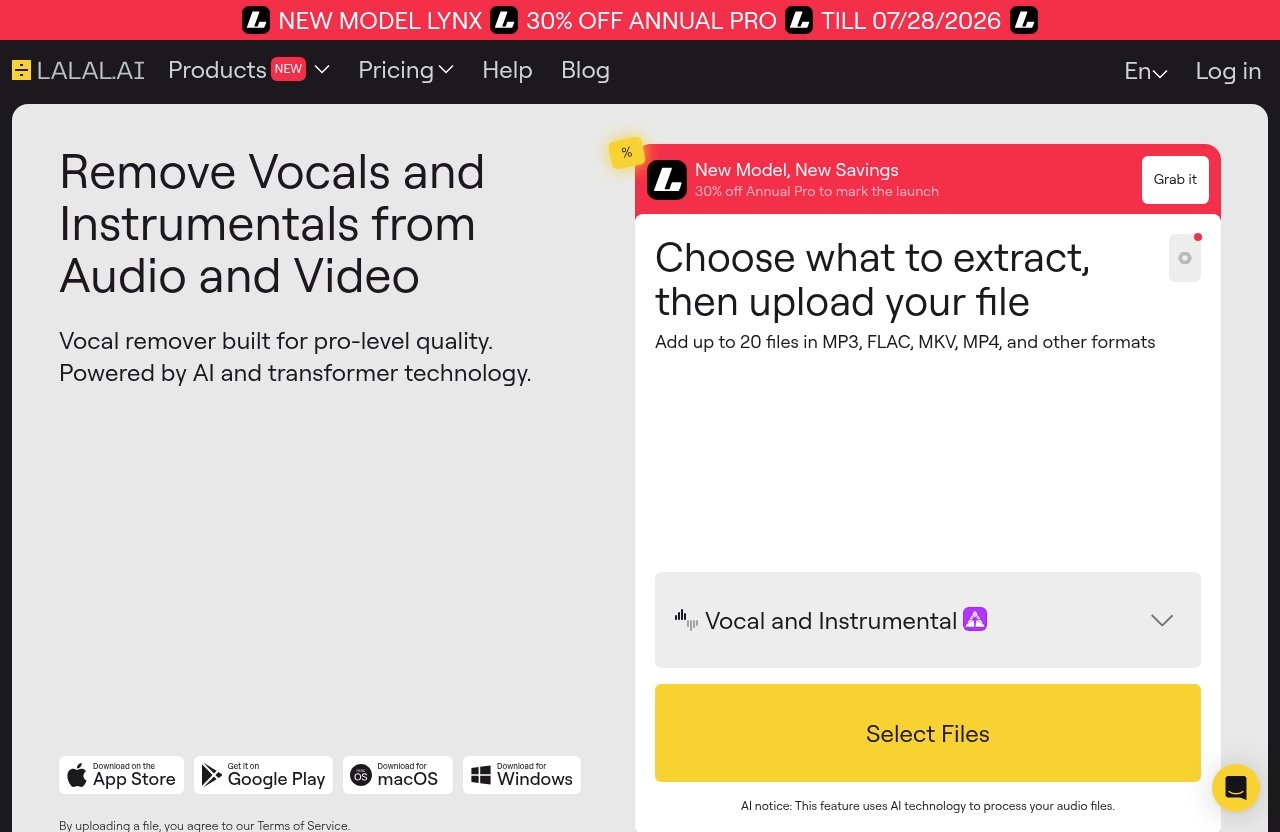
LALAL.AI’s official homepage also lists access options across Desktop for Windows, macOS, and Linux; iOS for iPhone and iPad; Android for Android phones and tablets; a VST Plugin that runs locally inside your DAW; and an API built for developers. If you are searching for “lalal ai voice changer download,” check the official LALAL.AI app and integration pages to confirm which access route fits your workflow.
Pricing And Access
Starter Plan
The official pricing page lists Starter as a free option. That makes the “lalal ai voice changer free” question easy to answer at a basic level: yes, there is a free Starter plan.
A free plan is useful for evaluation. It lets you test whether LALAL.AI Voice Changer makes sense for your own files before you commit to a paid plan.
Lite Plan
The official pricing page lists Lite at $9.99 per month or $90 annually. The annual price equals $7.5/month.
Lite is the plan to consider if you already know you will use the tool beyond a casual test. For creators with recurring audio or video projects, the annual comparison is worth checking against your expected usage.
Pro Plan
The official pricing page lists Pro at $19.99 per month or $180 annually. The annual price equals $15/month.
The pricing page also mentions a NEW MODEL LYNX and, as of the current date, shows a time-limited official 30% OFF annual PRO promo until 07/28/2026. Because promos can change, verify this directly on the official pricing page before making a decision.
For reference, you can review lalal ai pricing and test the product path from the official site here: LALAL.AI.
When To Upgrade
Upgrade only when the free Starter plan proves the workflow is useful for your files. That is the safest buying logic for LALAL.AI Voice Changer, especially if your source material varies from project to project.
If you are producing occasional experiments, Starter may be enough to evaluate fit. If you are regularly working on songs, videos, voiceovers, or client edits, Lite or Pro may make more sense depending on how much you expect to use it.
| Plan | Official Price | Best For |
|---|---|---|
| Starter | Free | Testing the workflow |
| Lite | $9.99/month or $90 annually | Regular creator use |
| Pro | $19.99/month or $180 annually | Heavier ongoing use |
Who Should Use It Vs. Who Should Skip It
Best For Musicians And Content Creators
LALAL.AI Voice Changer is best suited to musicians, producers, YouTubers, podcasters, short-form video creators, and other people working with recorded media. These users are likely to benefit from a file-based creative process.
For musicians, it can support demo exploration, alternate vocal colors, and vocal experimentation. For content creators, it can help test narration styles, character voices, or voice treatments in finished media.
It is especially appealing if you already use tools like vocal removers, stem splitters, or audio cleanup software. In that context, a voice changer is another production step rather than a confusing standalone novelty.
Best For Editors Working With Audio/Video Files
Editors who handle existing audio and video files are another strong fit. If your job is to reshape media after recording, LALAL.AI Voice Changer fits more naturally than it would for a live performer who needs real-time effects.
For example, a video editor may want to test whether a segment works better with a transformed voice. A podcast producer may want to experiment with an intro character or stylized segment.
The key is that the source already exists as a file. That is where the tool’s official positioning around music, audio recordings, and video files lines up with real production needs.
Not Ideal If You Want Instant Live Voice Effects
Skip LALAL.AI Voice Changer if your real goal is instant live voice effects. If you want to talk through a virtual microphone in real time, use a product built around live input, monitoring, and app routing.
Also skip it if you are looking for a one-click cure for poor recordings. In that case, you may need cleanup tools first, or you may need to re-record the source if quality matters.
Finally, be cautious if your project involves imitating a real person’s voice. That moves closer to voice cloning, impersonation, and rights questions, which require more care than ordinary creative transformation.
Trust, Quality, And Buyer Considerations
Why Quality Expectations Matter
AI audio tools can be impressive, but they are not immune to bad inputs or unrealistic expectations. The quality of LALAL.AI Voice Changer results should be judged on your own files, not on assumptions from search snippets or generic AI voice changer claims.
A fair evaluation looks at clarity, naturalness, emotional fit, and usefulness in the final project. A changed voice does not have to sound “perfect” in every context; it has to work for the actual media you are making.
This is why I would treat the free Starter plan as a practical audition. Test short examples that resemble your real use case before deciding whether a paid plan is worthwhile.
How To Judge Results On Your Own Files
Use a small evaluation checklist. Start with one music example, one spoken example, or one video example that represents your actual workflow.
Then compare the original and changed voice in context. If you are making a song, listen inside the mix. If you are editing video, judge it against picture, pacing, and background sound.
Ask these questions:
| Question | Why It Matters |
|---|---|
| Is the voice still understandable? | Clarity matters more than novelty |
| Does it fit the emotional tone? | A changed voice can alter meaning |
| Does it work in the full mix or edit? | Solo listening can mislead |
| Do I need cleanup first? | Noise or echo may affect usefulness |
| Is this transformation ethically safe? | Consent and rights still matter |
This approach keeps LALAL.AI Voice Changer in the right role: a tool to test and refine, not a promise of automatic perfection.
What To Look For Before Paying
Before paying, verify the current plan details on the official pricing page, confirm whether Starter gives you enough room to evaluate the tool, and compare Lite versus Pro based on actual usage rather than optimism.
Also check whether your workflow needs other LALAL.AI tools. If your main issue is separating vocals, use Vocal Remover or Stem Splitter. If your main issue is bad speech quality, consider Voice Cleaner or Echo & Reverb Remover. If your main issue is cloning a voice, evaluate Voice Cloner separately.
For legal and ethical context, be cautious with any AI voice work involving real people. The U.S. Copyright Office’s AI resources discuss how copyright and artificial intelligence raise ongoing rights questions, and laws can vary by jurisdiction. In practice, avoid unauthorized impersonation, get consent where needed, and do not use voice tools to mislead people.
Official website · Latest pricing & offers
FAQ
Is LALAL.AI Voice Changer Free?
Yes. The official pricing page lists a free Starter plan for LALAL.AI.
Paid options are also listed: Lite costs $9.99 per month or $90 annually, and Pro costs $19.99 per month or $180 annually. If you are searching for “lalal ai voice changer free,” Starter is the plan to check first.
What Does LALAL.AI Voice Changer Actually Do?
LALAL.AI Voice Changer transforms and changes voices in music, audio recordings, and video files using AI. It is best understood as a recorded-file voice transformation tool.
It is not mainly a live prank voice effect for calls, gaming, or chat apps.
Is LALAL.AI Good For Voice Changing?
It can be a strong fit for recorded audio workflows, especially if your goal is to change the sound of a voice in songs, voiceovers, spoken recordings, or video files.
The best way to judge LALAL.AI Voice Changer is to test it with your own source material and compare the output in the context of your project.
Is Voice Cloning Illegal?
Voice cloning legality depends on consent, rights, use case, and jurisdiction. It can create legal or ethical problems if used for impersonation, deception, or unauthorized commercial use.
If your project involves a real person’s voice, get permission and consider legal guidance before publishing or monetizing the result.
Which AI Voice Changer Is Free?
LALAL.AI offers a free Starter plan, so it can be considered a free ai voice changer option for testing the workflow.
For heavier use, the official pricing page lists Lite at $9.99 per month or $90 annually and Pro at $19.99 per month or $180 annually. Compare those plans only after confirming that the tool works well with your own files.
Practical takeaway: LALAL.AI Voice Changer is worth trying if you want to transform voices in recorded songs, audio, or video files, but it is not the right choice if you need live chat effects or full voice cloning. Test it on your own material first, judge the results honestly, and upgrade only if the workflow fits your real production needs.
Related Reading
- Lalal.AI Free vs Paid: Which Is Better in 2026?
- Does Lalal.AI Cost Money? Free vs Paid Plans Explained for 2026
- Lalal.AI Reviews 2026: Skeptical, Fair Buying Verdict