
Official website · Latest pricing & offers
LALAL.AI track splitting in 2026: what it is and who it is for
Quick verdict for buyers
LALAL.AI track splitting is a commercially compelling option for creators who want a straightforward way to separate music into usable parts without building a complicated audio-processing workflow. It is positioned as an AI Vocal Remover & Instrumental Isolator, with a Stem Splitter that can extract vocals, instrumental, drums, bass, guitar, synth, string, and wind instruments.
My assessment is deliberately cautious: the official product pages confirm a broad feature set, flexible export options, apps, and integrations, but they do not provide universal accuracy benchmarks for every genre or recording condition. That means LALAL.AI is best evaluated by previewing your own material, especially if you need clean stems for a professional release or detailed remix work.
For buyers comparing stem splitting software, its strongest appeal is convenience. The service combines music source separation, batch processing, lossless WAV export, mobile access, desktop apps, and a VST plugin for DAW-based users.
Best use cases: DJs, producers, remixers, podcasters
LALAL.AI track splitting makes practical sense for DJs preparing karaoke versions, producers collecting rough remix references, and editors who need to isolate or reduce a musical element quickly. A producer, for example, may use separated vocals as a starting point for arrangement ideas before recording a new vocal.
Remixers can use the platform to extract vocals and instrumentals, then bring the exported material into a DAW for timing, EQ, restoration, or creative processing. The key word is “starting point”: AI audio separation can be useful without replacing careful production work.
For podcasters and content creators, the Voice Cleaner, Echo & Reverb Remover, and Lead/Back Splitter listed on the official homepage may also be relevant. These are adjacent tools rather than reasons to assume every music stem will be flawless, but they widen the product’s usefulness beyond a standard vocal remover.
What “track splitting” means in practice
In practical terms, lalal.ai track splitting means uploading an audio file or supported input, choosing a separation option, and receiving individual parts rather than one mixed track. Depending on the selected splitter, that can mean vocals versus instrumental or more targeted instrument separation.
This is different from traditional multitrack recording. The tool works from a completed mix, so it is reconstructing separated components through AI rather than accessing the original studio session files. Buyers should keep that distinction in mind when comparing any AI stem separator.
If you have the original multitracks, those remain the more direct source for production. If you only have a stereo master, a track splitter can be a fast and useful alternative for practice, edits, remix preparation, karaoke, and content workflows.
How LALAL.AI works for stem splitting
Upload and split workflow
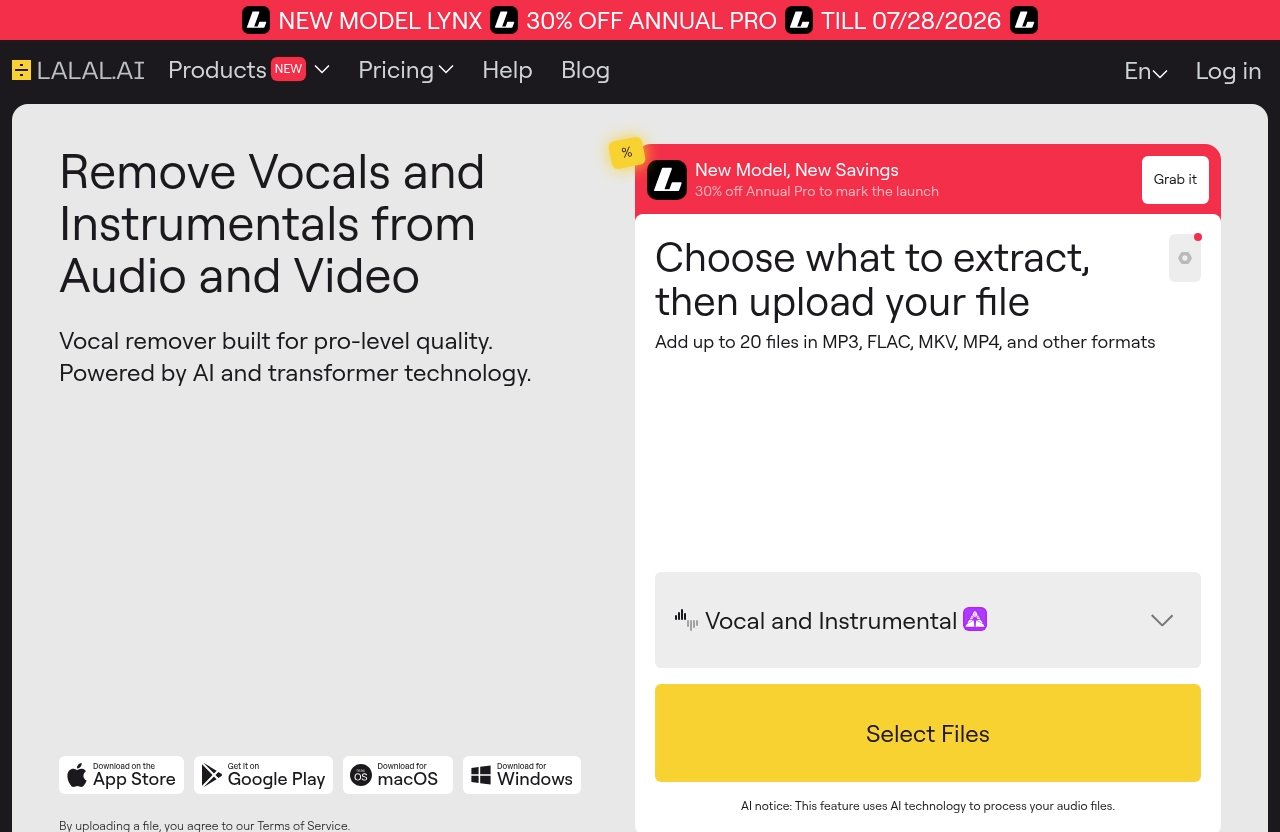
The official workflow for lalal.ai track splitting is intentionally simple: upload your file, let the platform perform an instant split, then download and export the result. LALAL.AI describes this as a three-step process, which is a sensible design for users who do not want to configure complex audio-routing tools.
The first step is uploading the source. The second is the instant split process. The third is downloading the separated results in your chosen format and quality settings.
For a DJ working on a short event edit, that workflow can reduce friction. For a producer handling an important remix, I would still recommend listening carefully to the preview and exported stems before committing to an arrangement or sending files to a collaborator.
Supported file types and inputs
According to the official product page, LALAL.AI accepts YouTube links, voice recorder input, MP3, WAV, and all audio files. This breadth is useful because source material often arrives in inconsistent formats, particularly for editors and social-video creators.
The ability to begin with a YouTube link may appeal to users preparing a reference, a practice version, or an early concept. However, buyers should ensure they have the necessary rights to use, distribute, alter, or monetize any source audio they process.
For routine lalal.ai track splitting work, WAV is usually the sensible source format when you have it available, since it avoids an additional lossy compression stage before separation. That is workflow advice, not a claim that every source will produce the same result.
What the DAW-style interface changes for users
The practical benefit of a DAW-oriented workflow is not that a browser tool replaces a full production environment. It is that users can move from source audio to downloadable stems without spending time on advanced setup.
LALAL.AI also offers a VST Plugin that runs locally inside a DAW, according to the official integrations page. For users who already work in a music-production project, that can make lalal.ai track splitting feel less like a separate web task and more like part of the session workflow.
The best approach is to separate first, then inspect the output in your regular audio editor or DAW. Listen for timing-sensitive transitions, low-frequency overlap, reverb tails, and artifacts around dense instrumental passages before building an edit around the files.
LALAL.AI stem quality and separation depth
Core stems vs full stem split
The official Stem Splitter description says LALAL.AI can extract vocals, instrumental, drums, bass, guitar, synth, string, and wind instruments. This gives buyers more depth than a basic vocal remover and instrumental isolator workflow, where the only choice is often “vocal” or “instrumental.”
That said, the listed stem categories should not be treated as a guarantee that every song will separate identically. A sparse acoustic recording and a dense, heavily mastered pop mix present very different music source separation challenges.
When assessing lalal.ai stems, start with the component that matters most for your project. If you need a karaoke backing, evaluate the vocal-reduced instrumental. If you need a remix vocal, inspect vocal intelligibility and the amount of audible musical bleed before deciding whether it is workable.
Instrument separation options
Instrument-level options are valuable when you need to focus on a particular production element. A bassist learning a part may be more interested in bass extraction than a full instrumental, while a producer may want drums or guitar as reference material for arrangement analysis.
For creative work, separated tracks can also become sound-design material. A filtered drum stem, altered vocal, or isolated synth-like layer may inspire a new edit, provided the source usage is appropriate for your project.
LALAL.AI track splitting is therefore not limited to removing vocals. Its official instrument categories make it relevant to people who need more selective separation, although users should preview each type against their own source material.
What creators should expect from separation quality
The official pages describe studio-grade, lossless audio quality and support for lossless 48kHz 24-bit WAV. Those are meaningful workflow specifications, particularly for users who want to avoid unnecessary degradation during export.
They are not the same as a published, genre-by-genre accuracy score. No responsible lalal.ai review 2026 should promise that every vocal, guitar, or drum layer will be artifact-free in every mix without independently verified testing.
In real buying terms, expect results to depend on the original recording. Dense arrangements, shared frequency ranges, wide stereo effects, layered backing vocals, distortion, and reverb can make any AI audio separation task more demanding. Use previews to decide whether the output is clean enough for your purpose rather than assuming a universal result.
Key features that matter for music production
Lossless 48kHz 24-bit WAV
For producers and editors, 48kHz 24-bit WAV support is one of the more important verified LALAL.AI capabilities. It aligns with common video, post-production, and modern DAW workflows where preserving workable audio quality matters more than creating a quick compressed file.
With lalal.ai track splitting, users can choose their preferred format and quality before export. That flexibility is valuable when a social-content draft only needs a convenient file, while a session handoff needs a higher-quality WAV export.
The practical advantage is choice. You can tailor exported material to the destination rather than forcing every use case into one download format.
Batch processing
LALAL.AI officially supports batch processing. For heavy users, this matters more than a single impressive separation result because it can reduce repetitive uploading and downloading across multiple files.
A DJ building a set of practice edits, an editor processing many clips, or a producer sorting reference tracks can benefit from handling multiple sources in one workflow. Batch processing makes the product more credible as track splitting software for recurring work rather than one-off experimentation.
Before purchasing for a large project, verify the live plans and extras information to understand which current allowances or conditions apply. The official pricing page should be the source of truth for that decision.
Unlimited previews
The Google Play Store listing mentions unlimited previews. That is a valuable buyer feature because it allows users to assess a separation before spending money on output they may not use.
For lalal.ai track splitting, previews can help answer the questions that a marketing page cannot answer for your exact song: Is the vocal sufficiently reduced? Is the drum part useful? Does the instrumental work for karaoke? Is the isolated element usable in a remix sketch?
I consider preview access essential for skeptical buyers. A best stem splitter is not simply the tool with the longest feature list; it is the one that produces an acceptable result on your own material at a cost you can justify.
Export stems individually or as a package
LALAL.AI lets users export stems individually or as a complete package. The official workflow also says you can download everything at once or select specific tracks.
This is a small feature with real production value. A content creator may only need the vocal track, while a remixer may want the full package for a DAW session.
It also supports more disciplined file management. Instead of downloading files you do not need, you can select the tracks relevant to the project and keep a cleaner workspace.
Official website · Latest pricing & offers
Plans and pricing: what you pay for in LALAL.AI
Verified pricing plans
LALAL.AI has an official pricing page with a plans and extras section. However, current prices, plan names, limits, credits, discounts, and inclusions must be verified directly from the live official pricing table before publication or purchase.
I am not listing numerical lalal ai pricing here because no current, verified figures were provided for this review. Inventing a price from memory is not helpful to buyers and can quickly become misleading.
Before paying, review the official LALAL.AI pricing page and confirm the price, included usage, export terms, and any extras that apply at the time you buy. Splitthetrack.com may earn a commission if you purchase through this link, but that does not change this assessment.
What is included in each plan
Because the live pricing table needs checking, buyers should compare the listed plans based on their actual current inclusions rather than relying on an old review. Look specifically for the processing capacity you need, whether batch work is relevant to your workflow, and which exports matter for your projects.
The important commercial question is not simply “Which plan is cheapest?” It is “Will this plan cover the number and type of files I realistically expect to separate?”
For occasional lalal.ai track splitting, a smaller purchase may be more sensible if available on the current table. For regular remix work, agency content production, or repeated client edits, a larger allocation may offer better practical value—but only after you confirm the official terms.
How to think about value for occasional vs heavy use
Occasional users should think in terms of risk reduction. Upload a representative file, use the available preview, and decide whether the separation is good enough before committing to a plan.
Heavy users should prioritize workflow. Batch processing, high-quality export options, individual-versus-package downloads, app availability, and plugin integration may justify more value than a low headline price alone.
A useful buying test is simple: calculate how often you will need to extract vocals and instrumentals over the next few months. If the tool saves meaningful editing time and the results pass your quality check, it has a clear business case.
LALAL.AI vs the alternatives buyers compare it with
Why users compare it against other stem splitters
Buyers generally compare a lalal ai stem splitter with other AI stem separator tools because the category solves similar problems: vocal removal, instrumental creation, isolated parts for remixing, and music source separation for editing.
The right comparison should focus on your workflow, not vague claims that one platform is universally superior. Consider the source inputs you use, the stem categories you need, preview availability, exports, processing volume, platform access, and any DAW or developer integration requirements.
Different users will assign different weight to those points. A mobile creator may care most about an app, while a studio producer may care more about lossless WAV and local plugin access.
Where LALAL.AI stands out
Based on the verified official feature set, LALAL.AI stands out through its combination of stem categories, lossless 48kHz 24-bit WAV, batch processing, individual or package exports, desktop and mobile apps, a local VST plugin, and an API for developers.
That combination gives lalal.ai track splitting broader workflow coverage than a single-purpose vocal remover. The ability to process from desktop, mobile, or inside a DAW may be particularly useful for creators who move between quick ideas and more structured sessions.
Unlimited previews, as mentioned in the Play Store listing, are also a meaningful buyer advantage. They support a test-before-you-commit approach that suits this category well.
Where it may not be the best fit
LALAL.AI may not be the best fit for buyers who expect AI separation to replace original multitrack files in every professional setting. If a project requires guaranteed isolated recordings, no audible remnants, or precise control over every original microphone channel, the original session assets remain preferable.
It may also be a poor purchase for someone who only needs a stem once and does not find the preview result useful enough. In that case, paying for a more extensive workflow would not be good value.
Finally, buyers who need a specific current price or plan limit should not proceed based on third-party summaries. Check the live official table first, as lalal ai pricing can change.
Apps, plugins, and workflow flexibility
Desktop app for Windows, macOS, and Linux
LALAL.AI provides desktop applications for Windows, macOS, and Linux. That official platform coverage is welcome for users who prefer a desktop workflow or work outside the two most common operating systems.
A desktop lalal.ai app can suit editors handling larger project folders, producers preparing files before a session, and users who prefer not to move source audio through a phone. Your choice should still reflect how you organize files, collaborate, and export finished assets.
The key advantage is platform flexibility rather than a claim that one app environment inherently produces better separation.
iOS and Android apps
LALAL.AI also lists iOS support for iPhone and iPad, plus Android support for Android phones and tablets. That makes it possible to begin a separation workflow away from a studio computer.
Mobile use is practical for quick previewing, karaoke preparation, collecting ideas, or creating social-content drafts. For extensive file organization and final DAW editing, many users may still prefer desktop, but mobile availability gives the service useful flexibility.
For users who regularly switch devices, lalal.ai track splitting can fit a workflow that begins with a phone recording and ends with exported stems in a larger production environment.
VST plugin and API for advanced workflows
The official LALAL.AI VST Plugin runs locally inside your DAW. This is the most relevant integration for producers, engineers, and remixers who want stem separation closer to their established project workflow.
The official API is built for developers. That can matter to teams building internal content pipelines, music tools, or automated processing systems, though technical buyers should review the current API documentation and commercial terms directly.
The lalal.ai plugin and API distinguish the product from tools that only offer a simple upload-and-download experience. Whether that matters depends on whether you work casually, professionally, or at scale.
Pros, cons, and buying verdict
Best reasons to buy
The strongest reason to buy LALAL.AI is its verified breadth of workflow options. It supports stem extraction categories including vocals, instrumental, drums, bass, guitar, synth, string, and wind instruments, alongside flexible exports and high-quality WAV support.
Batch processing is another practical benefit for repeat users. Combined with desktop, mobile, VST plugin, and API options, it gives buyers several ways to fit an AI stem separator into an existing process.
LALAL.AI track splitting is especially attractive for people who value speed and convenience but still want to inspect previews before deciding whether an output is usable.
Limitations to consider
The main limitation is inherent to the category: separating a finished mix is not the same as receiving original multitrack recordings. Results can vary with the source arrangement, effects, recording quality, and density of the mix.
The official feature list does not provide a universal guarantee of clean separation for every song, so buyers should avoid treating any AI tool as a one-click replacement for detailed restoration or studio multitracks. Previewing is the practical safeguard.
Pricing is another item to verify. Since live figures were not confirmed for this review, inspect the current official plans and extras table before making a value judgment.
Who should skip it
Skip LALAL.AI if you need original recording-session tracks, guaranteed perfection from every source, or fixed pricing details that you have not verified on the official site. It is also not essential for users with no recurring need for vocal removal, isolated instruments, or audio cleanup.
Buyers who only want one basic edit should preview first and decide based on that actual result. A feature-rich platform is only worthwhile if it solves a real workflow problem.
For everyone else, this is a credible track splitting software option to evaluate—particularly if flexible platforms and production integrations are part of the decision.
Final verdict: is LALAL.AI track splitting worth it in 2026?
Best overall use case
LALAL.AI track splitting is worth considering in 2026 for DJs, producers, remixers, creators, and editors who need fast access to separated vocals, instrumentals, and selected instruments from completed audio. It is especially well suited to karaoke backing tracks, remix prep, DAW stem export, reference analysis, and content cleanup.
The verified feature set is broad enough to support both casual and more structured workflows. Its strongest practical differentiators are flexible exports, batch processing, 48kHz 24-bit WAV support, app availability, and VST/API integrations.
Value for money summary
The value case depends on your source material and volume of work. If previews show that the stems meet your quality threshold and you will use the workflow regularly, LALAL.AI can save meaningful preparation time.
If your work demands original multitracks or flawless extraction from challenging recordings, treat it as an assistive tool rather than a final-answer solution. That is the most realistic way to assess the best stem splitter category as a whole.
Affiliate recommendation
For buyers whose previews meet their needs, I would consider LALAL.AI a strong, flexible choice for stem separation rather than an overhyped miracle tool. You can review the current plans and product details through LALAL.AI here; splitthetrack.com may earn a commission from qualifying purchases, at no added cost to you.
The bottom line: lalal.ai track splitting earns a positive recommendation for practical music and content workflows, provided you test your own audio and verify the live pricing terms before buying.
Official website · Latest pricing & offers
FAQ
What is LALAL.AI track splitting?
LALAL.AI track splitting is an AI-powered process for separating components of a mixed audio track. LALAL.AI is officially described as an AI Vocal Remover & Instrumental Isolator, and its Stem Splitter can extract vocals, instrumental, drums, bass, guitar, synth, string, and wind instruments.
It can be used with music, audio clips, and supported inputs such as YouTube links, voice recorder input, MP3, WAV, and other audio files. Typical uses include karaoke, remix preparation, production references, and audio-content editing.
How many stems can LALAL.AI extract?
The official LALAL.AI feature information confirms extraction options for vocals, instrumental, drums, bass, guitar, synth, string, and wind instruments. That is the verified list buyers should use when evaluating separation depth.
The exact options available for a specific track or workflow should be checked in the live product interface. Do not assume an unverified fixed number of simultaneous stems beyond the official categories listed.
Does LALAL.AI support batch processing?
Yes. LALAL.AI officially supports batch processing, allowing users to process multiple files in a more efficient workflow.
This is particularly helpful for DJs preparing several edits, producers reviewing multiple references, and content teams working through a folder of clips. Check the current pricing page for any plan-specific conditions before relying on batch processing for large-volume work.
Can I use LALAL.AI on desktop or mobile?
Yes. LALAL.AI has desktop apps for Windows, macOS, and Linux. It also has iOS apps for iPhone and iPad, plus Android apps for Android phones and tablets.
For DAW users, LALAL.AI also offers a VST Plugin that runs locally inside your DAW. Developers can explore the official API for more specialized integrations.
Is there a free preview before paying?
The LALAL.AI Google Play Store listing mentions unlimited previews. This gives users an opportunity to assess whether a vocal, instrumental, or other separated element is useful before purchasing output.
That preview step is important because AI separation quality depends on the source track. Use it to evaluate the material you actually plan to process rather than relying solely on general claims about any stem splitting service.
Related Reading
- Lalal.AI Pricing Plans Explained in 2026
- Is Lalal.AI Any Good in 2026? Honest Review, Pros, Cons, Quality, and Value
- Best Stem Splitter 2026: Top 7 Tools for Clean Vocals, Drums, Bass, and Remix Stems