
For anyone who wants to turn a finished song into remix-ready vocals or a sing-along instrumental, LALAL.AI acapella workflows are built around AI stem separation. Instead of manually EQing away drums and synths, you upload a track, isolate vocals from song audio, and export either the vocal-only version or the instrumental counterpart.
I find this approach most useful when the goal is practical rather than archival: preparing remix vocals, making a karaoke track, studying a vocal line, or testing an arrangement idea. The key is setting realistic expectations. AI can produce highly usable splits, but it cannot guarantee a flawless reconstruction of the original multitrack vocal session.
Official website · Latest pricing & offers
What ‘LALAL.AI acapella’ means in practice
Acapella vs vocals-only vs instrumental
In everyday music-production language, an acapella is a version of a song containing vocals without the musical backing. A vocal stem is the separated audio file containing those vocals, while an instrumental is the opposite output: the music with vocals reduced or removed.
With a LALAL.AI acapella split, you are generally creating an AI-isolated vocal stem from a mastered song. It may include lead vocals, harmonies, ad-libs, breaths, and some residual reverb depending on how the original track was mixed.
That distinction matters for remixers. An official studio acapella comes from the original production sessions; an AI-generated acapella comes from separating a finished stereo mix. The latter can still be excellent for creative work, but it is not automatically identical to the source vocal recording.
When you would use LALAL.AI acapella for this workflow
A LALAL.AI acapella workflow makes sense when you have only the released song file and need vocals or an instrumental quickly. DJs can prepare an acapella for transitions and mashups, producers can audition remix ideas, and singers can create a karaoke-style practice version.
For example, a producer might isolate vocals from song audio, align the extracted vocal to a new beat, then use the original instrumental output as a reference for phrasing and timing. A hobbyist may instead keep the instrumental and use it as a karaoke track.
This is also useful for learning. Hearing a vocal stem on its own can reveal doubles, harmonies, vocal effects, rhythm choices, and arrangement details that are harder to notice in the full mix.
What kind of results to expect from AI stem separation
The best LALAL.AI acapella results usually come from clear, professionally mixed tracks with a centered lead vocal and reasonably distinct instrumentation. You may hear clean lyric intelligibility and a usable vocal tone, particularly where the singer occupies a different frequency range from the instruments.
Still, no AI stem separation tool can remove every challenge in every mix. Reverb, wide backing vocals, distorted guitars, crowd noise, and instruments that overlap heavily with the voice can leave traces in the extracted file.
Treat the output as a creative working stem. For a remix, social video, rehearsal, demo, or rough edit, it may be exactly what you need. For commercial release work where every detail matters, you may need to clean the result further or obtain authorized original stems.
How to create an acapella from a song with LALAL.AI
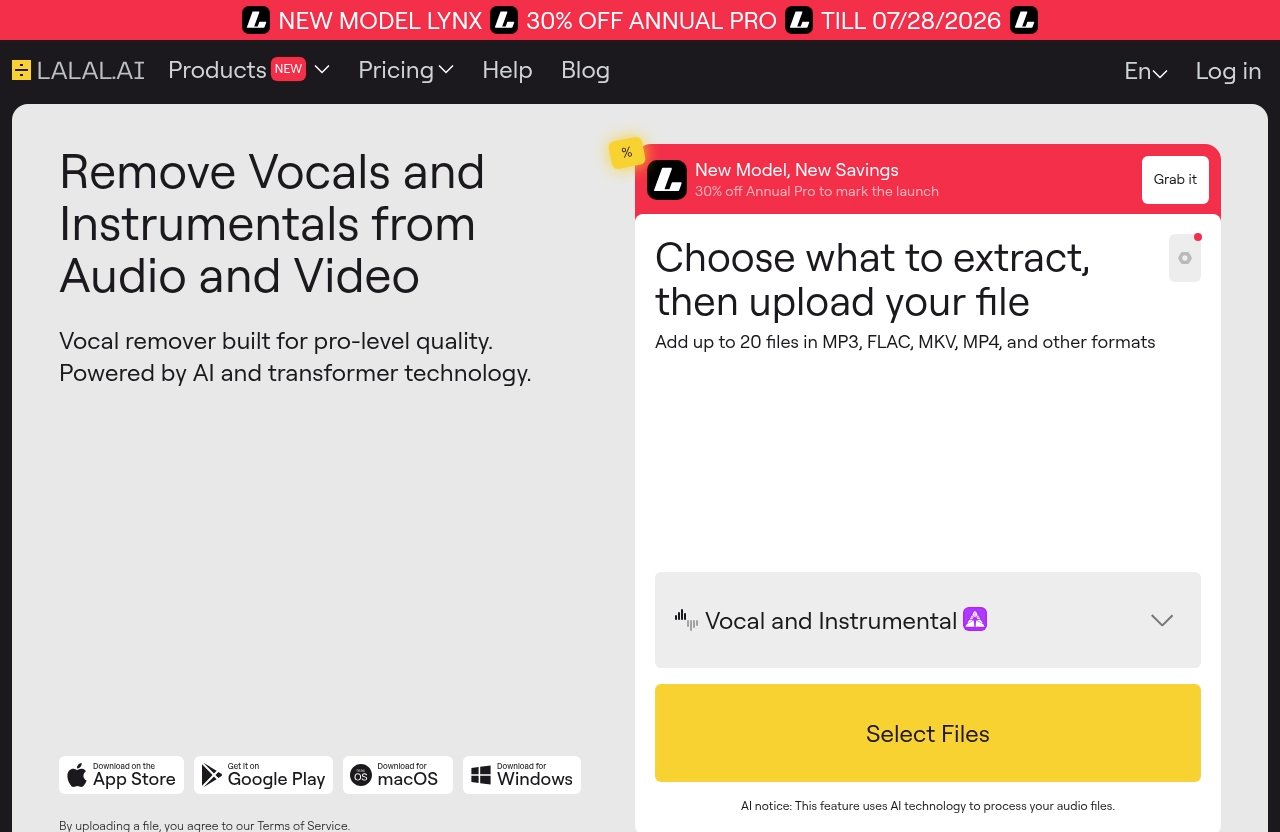
Step-by-step LALAL.AI acapella web workflow
Creating a LALAL.AI acapella is straightforward when you start with the best available source file. The basic process is:
- Choose the Vocal Remover or another relevant separation tool.
- Upload the song or audio clip you want to split.
- Select the appropriate vocal-focused separation option.
- Let the service process the file.
- Preview the separated results when available.
- Download the vocal output for your acapella and the instrumental output if you also need a backing track.
Before uploading, listen to the source from beginning to end. If it already contains clipping, heavy compression artifacts, crowd noise, or a low-bitrate stream rip, those problems can remain audible after separation.
Also make sure you have the rights or permission needed for your intended use. Isolating vocals for private practice is different from releasing a remix, distributing a sample pack, or monetizing a video.
Choosing the right split mode for vocals
For a standard LALAL.AI acapella task, begin with the Vocal Remover, which is officially described as removing vocals and instrumentals from music tracks, audio clips, or videos. This is the logical choice when you simply need vocal-only and instrumental versions.
If your project needs more detailed production elements, the Stem Splitter can extract vocals, instrumental, drums, bass, guitar, synth, string, and wind instruments. That may be useful when a producer wants to compare the vocal isolation against individual musical components rather than work from a single instrumental file.
Where a song has obvious harmony stacks or choir-style layers, consider the Lead/Back Splitter. LALAL.AI describes it as separating lead and backing vocals with pinpoint accuracy, making it especially relevant when the lead performance is your priority.
Exporting and checking the vocal stem
Once you have your LALAL.AI acapella output, do not judge it only through laptop speakers. Import the vocal stem into your DAW or audio editor, then listen on headphones and a second playback system if possible.
Check three areas: lyric clarity, timing, and artifacts. Listen closely at consonants, pauses between phrases, cymbal-heavy sections, and moments where instruments briefly mimic the singer’s pitch or tone.
For remix vocals, align the stem to your project tempo before making creative decisions. If a few short sections contain bleed, you can often work around them with arrangement choices, brief edits, effects, or by avoiding those bars in the final remix.
How good is LALAL.AI at acapella separation in 2026?
Clean vocal isolation strengths
In 2026, LALAL.AI acapella separation is best evaluated by usability, not by a claim that every result will be perfect. The service is designed to separate vocals and instrumentals, and the workflow is convenient for users who need a fast, accessible vocal remover rather than a complex manual restoration process.
A cleanly recorded pop, dance, acoustic, or singer-songwriter track can be a good candidate because the lead vocal is often prominent in the center of the mix. When the voice has enough tonal and spatial distinction from the accompaniment, the vocal stem can be practical for remixes, editing, study, and karaoke preparation.
The important advantage is speed. You can test whether a track is workable before spending hours trying manual EQ, phase tricks, or spectral editing techniques that may not produce a better result.
Where artifacts can still appear
Even a strong LALAL.AI acapella splitter cannot bypass the limitations of a finished mix. Audible remnants may occur when a vocal shares frequencies with guitars, synth leads, snare transients, or saturated effects.
Reverb is another common challenge. A lead vocal may be separated clearly while its reverb tail blends into the instrumental, leaving a faint wash or texture around words. That is not necessarily a failure; it reflects how tightly the elements were combined in the original master.
Backing vocals can complicate things as well. If harmonies are integrated into the same space as the lead, a standard vocal-versus-instrumental split may retain them. For projects that require more control, the dedicated Lead/Back Splitter is the relevant official LALAL.AI product to explore.
Track types that are easiest and hardest
The best candidates for LALAL.AI acapella extraction tend to have a clear vocal, balanced mastering, and relatively separate musical elements. Studio songs with a focused singer and moderate effects usually offer more predictable results than dense live recordings.
Harder examples include concert recordings with audience noise, songs with huge layered choruses, aggressive distortion, heavily tuned or vocoder-based vocals, and older low-quality uploads. Dense orchestral productions can also be difficult because strings, brass, and vocal harmonics can overlap.
Here is a practical way to judge a source before you spend time editing:
| Source characteristic | Likely separation experience | Practical recommendation |
|---|---|---|
| Clear centered lead vocal | Often more usable | Start with a vocal-focused split |
| Sparse acoustic arrangement | Usually easier to assess | Check breaths and room ambience |
| Dense electronic chorus | May contain synth or harmony bleed | Test the chorus before committing |
| Live recording | Crowd and room sound can remain | Use for reference or practice first |
| Low-quality stream rip | Existing artifacts may become more obvious | Find a cleaner authorized source |
Best use cases for acapella splitting
Remixes and mashups
For DJs and producers, LALAL.AI acapella output can be a fast way to audition a mashup concept. Extract the vocal, place it over a new instrumental, and quickly find out whether the phrasing and key relationship are promising.
I would use the first split as a creative sketch rather than assume it is final-release material. If the idea works, you can refine transitions, mute problematic words, add effects, or seek properly licensed stems where the project requires them.
The instrumental isolator output is equally valuable here. It lets you hear what remains after vocal removal and can help with transitions, karaoke edits, or arrangement analysis.
Karaoke and sing-along tracks
A LALAL.AI acapella split can support karaoke workflows in two ways. You can keep the extracted vocal for learning the melody and phrasing, or use the instrumental version as a sing-along backing track.
Karaoke quality depends strongly on the song. If the vocal is dry and clearly positioned, the instrumental may feel impressively complete. If the original production has heavy vocal reverb or layered harmonies, some vocal traces may remain behind.
For home practice, parties, lesson preparation, or personal content drafts, that is often acceptable. For a polished karaoke catalogue, evaluate each song individually and listen for leftover lead-vocal phrases before publishing anything.
Practice, transcription, and sampling
Musicians often use LALAL.AI acapella files to study phrasing, harmonies, pronunciation, and timing. Isolated vocals can make it easier to transcribe a melody or understand where a singer changes register.
Producers can also use a separated vocal stem as a reference while rebuilding an arrangement. The goal is not necessarily to sample or reuse the file; it may simply help identify song structure and performance details.
If you intend to sample, distribute, or release any extracted material, copyright and licensing still apply. Separation technology does not grant permission to use a recording commercially.
Official website · Latest pricing & offers
LALAL.AI features that matter for acapella users
Vocal Remover and Stem Splitter
The core LALAL.AI acapella feature for most users is Vocal Remover. Officially, it can remove vocals and instrumentals from music tracks, audio clips, or videos, which directly fits a vocal-only or instrumental workflow.
Stem Splitter is more detailed. According to LALAL.AI’s official product information, it can extract vocals, instrumental, drums, bass, guitar, synth, string, and wind instruments. That broader selection can help when a producer needs to inspect or reuse different arrangement components.
The best choice is based on the job. Use a simple vocal remover when you want a quick acapella and backing track; consider a multi-stem approach when you need more granular creative control.
Lead/Back Splitter
For songs with stacked hooks, harmony vocals, doubles, or background chants, Lead/Back Splitter is particularly relevant. LALAL.AI officially states that this product separates lead and backing vocals with pinpoint accuracy.
That does not mean every original mix will divide into perfectly isolated individual singers. It means the feature is purpose-built for a different problem than ordinary vocal-versus-instrumental separation.
If your remix needs the main singer but not chorus harmonies, this is the feature worth testing first. It can also help vocal arrangers study how a production balances lead and backing vocals.
Apps, plugins, and API
LALAL.AI officially offers desktop apps for Windows, macOS, and Linux, plus iOS support for iPhone and iPad and Android support for phones and tablets. That makes a LALAL.AI acapella workflow possible whether you work at a desktop setup or prepare tracks on mobile.
The company also offers a VST Plugin that runs locally inside a DAW. For producers, that is useful context because it suggests a workflow closer to the music-production environment rather than only a browser-based process.
Developers can access an API as well. This is more relevant for teams building audio tools, catalog workflows, or automated media-processing systems than for someone making a one-off karaoke track.
LALAL.AI pricing for acapella splitting
Official plan structure
Pricing should be checked directly on the live official LALAL.AI pricing page before you buy. The verified information provided for this review does not include visible plan names, prices, minute limits, top-up amounts, trials, or feature inclusions, so I will not invent or estimate those details.
That is especially important for frequent LALAL.AI acapella users. Audio-processing plans can change, and a plan that suits a casual hobbyist may not suit a DJ preparing a large library.
What to verify before subscribing
Before choosing paid access, confirm the current official details for:
- Available plan names and prices
- Processing limits or credits
- Whether your preferred products are included
- Download and output options shown on the checkout or pricing page
- Any rules affecting commercial, professional, or API use
- Refund, renewal, and account terms
This takes a few minutes and avoids buying based on outdated third-party pricing tables. It is also the best way to compare the cost against the number of tracks you genuinely expect to process.
Who should choose paid access
Paid access is likely most sensible for users who repeatedly need LALAL.AI acapella outputs: working DJs, remix producers, video editors, music teachers, and creators building recurring karaoke or practice materials.
For a single experiment, start by confirming the current official options and testing your most representative track first. If the result suits your workflow, you can explore LALAL.AI’s current tools and pricing with a clearer idea of what you actually need.
Common problems and how to improve results
Reduce bleed and noise before upload
When a LALAL.AI acapella contains instrumental bleed, identify whether the issue is in the original audio or the separation result. If the source already has hiss, clipping, crowd noise, or heavy mastering distortion, upload quality is the first problem to solve.
Avoid adding extra processing before your first test unless it clearly improves the source. Aggressive noise reduction, stereo widening, or EQ can blur the information an AI model needs to distinguish voice from accompaniment.
Instead, make a clean copy of the source and compare results. Use the output that is most intelligible and musical for your goal, not simply the one that sounds most aggressively filtered.
Use the cleanest source file possible
Source quality is the biggest controllable factor in LALAL.AI acapella extraction. Use an authorized, high-quality file rather than a recording captured through speakers, a heavily compressed social-media clip, or a low-bitrate download.
Listen for clear vocals before processing. If you can barely hear the lyrics in the original, AI separation cannot reliably create missing detail; it can only attempt to distinguish what is already present.
For best results, test a verse, chorus, and instrumental break. A song may separate well in a quiet verse but struggle in a dense chorus, so evaluate the sections you actually plan to use.
When to try a different stem splitter
Try another LALAL.AI separation option when the problem is not simply vocals versus music. If background harmonies are the issue, Lead/Back Splitter may be more appropriate than a standard vocal remover.
If you need to understand why a section is bleeding into the vocal, Stem Splitter can be useful because it targets multiple instrument categories. Separating drums, bass, guitar, synth, string, or wind elements may give you a clearer picture of the arrangement.
Do not keep reprocessing the same difficult file expecting a completely different outcome. Change the source, select the tool that matches the problem, or alter the creative plan around the cleanest usable passages.
Who should use LALAL.AI for acapellas—and who should not
Ideal users
The ideal LALAL.AI acapella user wants speed, accessibility, and useful creative stems without needing to own the original multitrack session. This includes DJs testing blends, producers sketching remixes, singers practicing melodies, editors preparing references, and hobbyists making personal karaoke tracks.
It is especially appealing when you need both sides of the split: the vocal stem for analysis or remix work and the instrumental for a backing track. The availability of web-oriented tools, desktop apps, mobile apps, a VST Plugin, and an API also gives different types of users a relevant route in.
Users who need a different tool
LALAL.AI may not be the right answer for every project. If you require officially delivered studio stems, individual microphone tracks, flawless removal of all vocal effects, or guaranteed release-ready results from every song, AI separation is not a substitute for the original session files.
Users working with extremely poor sources, complex live recordings, or legally sensitive commercial releases should also be cautious. In those cases, obtain licensed stems, contact rights holders, or use the extraction only as a private reference.
Decision checklist before buying
Use this checklist before committing to a LALAL.AI acapella splitter workflow:
| Question | If the answer is yes |
|---|---|
| Do you have a clean source file? | Your chance of a useful split is higher |
| Do you only need vocals and instrumental? | Start with Vocal Remover |
| Do you need multiple instrument parts? | Consider Stem Splitter |
| Are backing harmonies the main issue? | Test Lead/Back Splitter |
| Is this for a remix, practice, or karaoke draft? | AI separation can be a practical fit |
| Do you need guaranteed original studio stems? | Seek authorized source materials instead |
Final verdict: is LALAL.AI the best acapella splitter in 2026?
Best for speed and convenience
For practical vocal extraction, LALAL.AI acapella is a strong option for people who want to create an acapella from song files without a technical restoration workflow. Its official Vocal Remover, Stem Splitter, and Lead/Back Splitter tools address the main needs of remixers, karaoke users, and producers.
The platform coverage is also a meaningful advantage. Desktop apps are available for Windows, macOS, and Linux, while iOS and Android support makes it more flexible for users who work away from a studio computer.
Best for clean vocal extraction
The best results will come from clean, well-mixed recordings with clear lead vocals. On suitable tracks, the LALAL.AI acapella approach can provide a useful vocal stem quickly enough to support remix planning, vocal study, karaoke production, and creative experimentation.
However, it is not reasonable to expect perfection from difficult source material. Dense arrangements, loud backing vocals, reverb, live ambience, and low-quality audio can all affect the final split.
Verdict by user type
My verdict is straightforward: LALAL.AI is worth considering in 2026 for DJs, hobbyists, music students, producers, and content creators who value quick, practical acapella and instrumental separation. It is most compelling when you accept AI stem separation as a creative tool rather than a replacement for licensed studio multitracks.
If that matches your workflow, try a representative song first and judge the vocal clarity in the sections you will actually use. For many everyday remix, practice, and karaoke needs, LALAL.AI acapella tools offer a sensible place to start.
Official website · Latest pricing & offers
FAQ
Can LALAL.AI create an acapella from any song?
LALAL.AI can isolate vocals from many songs, but no AI tool can guarantee the same quality for every recording. A LALAL.AI acapella result depends on the original mix, vocal placement, source-file quality, background elements, reverb, and arrangement density.
Clear studio tracks usually offer the most useful starting point. Live recordings, low-quality files, and extremely dense productions may retain more artifacts or instrumental bleed.
What is the difference between an acapella and a vocal stem?
A vocal stem is the separated audio track containing vocals from a larger mix. An acapella is generally the vocal-only version created from that stem for listening, editing, remixing, or performance use.
In practice, people often use the terms interchangeably. The important distinction is that an AI-generated vocal stem is extracted from a finished recording, while an official acapella may come directly from the original production sessions.
Does LALAL.AI remove backing vocals too?
Standard vocal-versus-instrumental separation focuses on vocals and instrumental content. For more specific handling of lead and backing vocals, LALAL.AI offers Lead/Back Splitter, officially described as separating lead and backing vocals with pinpoint accuracy.
Results still depend on how the song was mixed. Closely blended harmonies and heavily processed chorus vocals can be more challenging than an exposed lead vocal.
Is LALAL.AI good for karaoke tracks?
LALAL.AI can be useful for creating karaoke-style instrumental tracks by removing or reducing the vocal from a song. It can also help singers isolate vocals for learning before practicing with the instrumental output.
Quality varies by song. Always listen for leftover vocal phrases, reverb, or harmony traces before using an instrumental in a public or professional setting.
What file types and devices does LALAL.AI support?
The verified official information for this article confirms desktop apps for Windows, macOS, and Linux; iOS support for iPhone and iPad; and Android support for phones and tablets. LALAL.AI also offers a VST Plugin that runs locally inside a DAW and an API for developers.
Specific supported upload and download file types are not confirmed in the source information provided here. Check the current official LALAL.AI upload guidance before processing a particular audio or video format.
Related Reading
- Lalal.AI Pricing Plans Explained in 2026
- How to Use Lalal.AI for Acapellas: Clean Vocal Exports in 2026
- Lalal.AI Track Splitting Review 2026: Is It Worth It for Stems?