
Official website · Latest pricing & offers
Quick verdict: is the LALAL.AI Android app worth it in 2026?
This lalal.ai app review finds the official Android app worth installing for creators who need quick vocal or instrument separation away from a computer. It is positioned for practical mobile tasks: uploading a file, previewing separated parts, and getting a usable starting point for a remix, edit, practice track, podcast cleanup workflow, or content idea.
My view is based on the official Google Play listing, the LALAL.AI homepage, and the official pricing information available at the time of writing. The app looks most compelling as a convenient extension of the broader LALAL.AI service—not necessarily a complete replacement for a focused desktop workflow.
Affiliate disclosure: SplitTheTrack may earn a commission if you use qualifying links in this article. This does not affect the editorial assessment or cost of checking the official service.
Who this app is best for
The LALAL.AI Android app is best for musicians, producers, DJs, podcasters, video editors, and casual creators who regularly receive audio or video files on a phone. If you want to isolate a vocal, remove background music, or quickly test whether a song can be split into useful stems, mobile convenience is the central benefit.
It also suits people who value previews before committing to a larger project. For example, a remixer can check whether a vocal is likely to be clean enough before opening a full desktop session later.
Who should skip it
Skip—or at least do not rely on—the app as your only tool if you routinely manage long, high-volume projects with detailed file organization. Mobile screens are inherently less comfortable for comparing multiple outputs, naming files, arranging exports, and reviewing nuanced edits.
This lalal.ai app review also suggests caution for anyone who has not checked current purchase terms. The Play listing indicates in-app purchases, so verify the live pricing page and in-app options before uploading important work.
Bottom-line verdict based on the Google Play listing
The official listing presents a credible mobile stem-separation option with 500K+ downloads, 2.81K reviews, and a 3.4-star rating. That is enough public usage to take the app seriously, but the middling rating is also a reason to test it first with a non-critical file.
For on-the-go separations and previews, it is a sensible install. For intensive production, treat the Android app as a companion to the web or desktop-oriented LALAL.AI experience.
What is LALAL.AI?
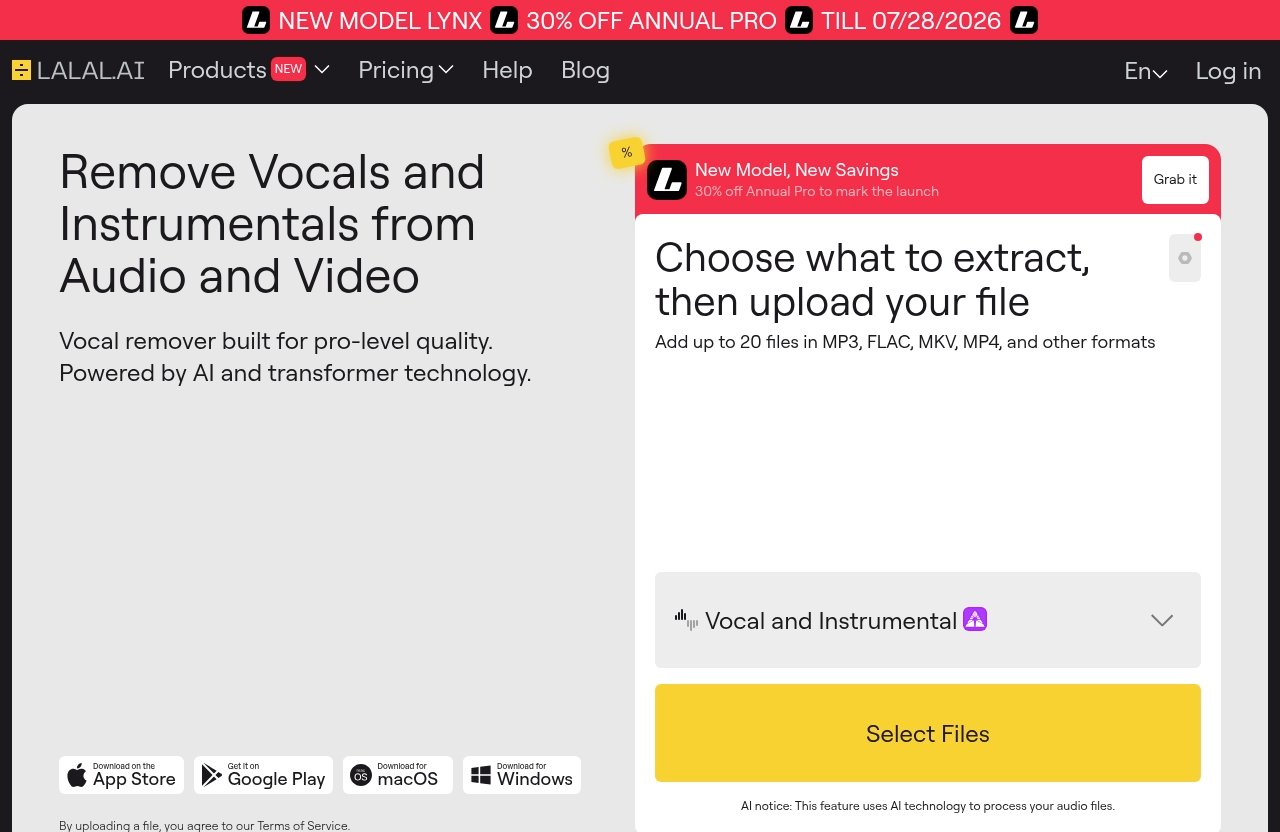
LALAL.AI is an AI-powered audio-processing platform best known as a vocal remover and instrumental isolator. Its official homepage positions it as a suite of tools for separating and improving sound, rather than a single-purpose app.
The service is relevant to creators who need to pull apart elements of a recording without manually rebuilding the song. That can be useful for practice tracks, remixes, sampling research, podcast editing, video post-production, and audio cleanup.
Core use case: vocal remover and stem splitter
At its core, the lalal.ai app review topic is about separation: identifying vocals, music, and instrumental components within a mixed file. The official product range includes Vocal Remover and Stem Splitter tools, which align with the Android listing’s promise to isolate vocals, background music, and instruments.
A result should be viewed as an AI-generated working asset, not an automatic guarantee of studio-perfect multitracks. Separation quality can reasonably vary by the source recording, arrangement density, vocal effects, mastering, and file condition.
How the mobile app fits into the LALAL.AI ecosystem
The lalal ai android app is one part of a broader ecosystem that includes web-based tools, desktop and iOS apps, VST plugins, and API integrations. The official homepage also lists Voice Cleaner, Voice Changer, Voice Cloner, Echo & Reverb Remover, and Lead/Back Splitter products.
That wider ecosystem matters because the app is not presented as a standalone novelty. It is a mobile route into a platform designed around AI audio processing across different devices and workflows.
For a broader explanation of common use cases, see our guide to [what LALAL.AI is used for](/what-is-lalal-ai-used-for/).
Difference between the app, web app, and other products
The LALAL.AI mobile app emphasizes portability: use it where files are already stored or received on your Android device. The web experience is generally more comfortable when you have many files, prefer a larger screen, or need a more deliberate project workflow.
Meanwhile, the desktop apps, VST plugins, and API integrations listed on the official homepage address different ways of accessing the same general audio-processing category. This lalal.ai app review focuses only on the Android app and should not be read as a feature-by-feature review of every LALAL.AI product.
Google Play listing snapshot
The official Google Play listing is titled “LALAL.AI: AI Vocal Remover – Apps on Google Play.” It provides useful baseline signals for anyone deciding whether the Android version is established enough to test.
Developer, installs, and star rating
The listing identifies the developer as Omnisale GmbH. At the supplied listing snapshot, the app showed 500K+ downloads and a 3.4-star rating.
These figures do not prove that every user will get the same results. They do show that the lalal ai mobile app has reached a substantial number of Android users, while the rating suggests that user experiences are mixed rather than universally enthusiastic.
| Google Play listing detail | Supplied official listing data |
|---|---|
| App title | LALAL.AI: AI Vocal Remover |
| Developer | Omnisale GmbH |
| Rating | 3.4 stars |
| Reviews | 2.81K reviews |
| Downloads | 500K+ |
| Age rating | USK: All ages |
| Monetization signal | In-app purchases |
Review volume and what it suggests
The 2.81K review count is more informative than a rating alone because it indicates the score is based on a meaningful number of responses. Still, reviews can reflect many factors beyond separation quality, including account access, payment expectations, upload times, device differences, or individual source files.
In this lalal.ai app review, the sensible interpretation is measured: there is enough feedback to avoid treating the app as untested, but a 3.4-star average warrants a trial mindset. Read recent reviews on the live listing for issues that may matter to your device or workflow.
For more perspective on public sentiment, our [LALAL.AI customer reviews guide](/lalal-ai-customer-reviews/) separates platform feedback from marketing claims.
Age rating and app category
The provided Google Play information shows a USK: All ages rating. The listing also indicates that the app includes in-app purchases.
The age rating is not a judgment about the suitability of every song or video a person might process. It is store metadata about the application itself. Parents, educators, and team managers should still review the actual files and account settings used in their own workflow.
Key features highlighted on the Play Store
The Play Store description snippet highlights several capabilities that make the LALAL.AI vocal remover app more than a basic vocal/musical toggle. These are store-listed claims, so they should be understood as the developer’s current feature description rather than an independent quality guarantee.
10-stem separation capabilities
According to the listing snippet, the app offers 10-stem separation and can isolate vocals, background music, and eight instruments with “exceptional precision.” In practical terms, this is relevant when a creator wants more targeted parts than simply “voice” and “instrumental.”
A producer may want to inspect an instrumental element, while an editor may need a cleaner music bed and a podcaster may care most about voice-related isolation. The actual usefulness depends on whether the available stem options match the source material and the job at hand.
Audio and video file support
The listing specifically highlights support for audio and video files. That is valuable for mobile users because many real-world clips arrive through messaging apps, phone storage, social platforms, or camera folders rather than as neatly organized audio projects.
This makes the lalal.ai stem splitter app potentially useful for short-form video editors who need to investigate a soundtrack or isolate an audio element from a video source. Always make sure you have the legal right to process, reuse, edit, or distribute the material involved.
Batch upload and unlimited previews
The Play Store snippet says users can upload up to 20 files at a time and access unlimited previews. Batch upload can reduce repetitive handling when you are checking several takes, songs, clips, or possible samples.
Unlimited previews are especially helpful as a decision-making feature. In an editorial sense, previews lower the risk of paying for an output before you have a reasonable sense of whether the separation is useful for your particular file.
Noise reducer and export behavior
The listing also highlights a noise reducer, which may be relevant for voice-focused material and recordings with distracting background sound. It is important not to overstate this: the supplied text confirms that a noise reducer is highlighted, but it does not provide detailed quality conditions, processing limits, or specialized restoration claims.
The provided Play Store snippet does not specify export formats, bitrate options, naming controls, or other export behavior. Check the current app interface and listing before treating those details as part of your purchase decision. That distinction is important in any trustworthy lalal.ai app review.
Permissions, privacy, and data safety
Audio tools often work with personal voice recordings, unreleased music, client sessions, interviews, and commercial footage. That makes privacy review essential, even when the tool’s main purpose is legitimate and creative.
What to look for in the Data safety section
Before installing from lalal.ai google play, open the live Data safety section in Google Play. Review what the store currently says about data collection, sharing, security practices, and deletion options.
The supplied listing excerpt does not include the full Data safety panel, so it would be inaccurate to state specific lalal.ai permissions or data-handling details here. Store policies and disclosures can change, which is exactly why checking the live page matters.
Why permissions matter for audio apps
An audio-processing app may need access that enables you to select files or upload content for processing. The key question is whether the access request makes sense for the feature you are trying to use and whether you are comfortable with the accompanying data practices.
For sensitive client material, I recommend reading the provider’s current policies before uploading and using a test file first. Do not assume that a mobile app handles data in the same way as a local-only desktop editor unless official documentation says so.
Red flags to watch before installing
Install only from the official Google Play listing showing Omnisale GmbH as the developer. Be cautious of lookalike apps, unofficial APK downloads, unexpected payment prompts, or permission requests that do not appear relevant to the task you selected.
For a more detailed safety checklist, read our [is LALAL.AI safe guide](/lalal-ai-safe/). The short version is simple: verify the developer, inspect lalal.ai data safety information on the live listing, and keep sensitive work out of any service until you understand its current terms.
Official website · Latest pricing & offers
Performance expectations on mobile
The most realistic way to assess the app is as a convenience-first tool. It can make stem separation accessible when a computer is unavailable, but a phone remains a less efficient environment for extended project management.
Convenience vs. desktop workflow
The major advantage of the lalal ai android app is that it meets users where their files already are. If someone sends you a demo, interview clip, beat idea, or video while you are away from the studio, you can begin evaluating it immediately.
Desktop workflows are usually better for extended sessions simply because they offer more screen space, easier multi-file management, and less friction when organizing results. That is a workflow observation, not a claim that the underlying processing is different.
Previewing stems before committing
The listing’s unlimited-preview claim is particularly useful on mobile. Rather than treating every upload as a final production decision, creators can use a phone to assess whether a vocal, instrumental section, or other separated element is promising enough to pursue.
In my view, that is the strongest reason to install the app. The lalal.ai app review value is not just “separate a song on a phone”; it is “make a faster creative decision while mobile.”
Where mobile is genuinely useful
Mobile use makes the most sense for quick checks, straightforward splits, and work that begins in a phone-based workflow. A podcaster could inspect a field recording, a musician could create a practice reference, and a video editor could test a source clip before beginning a larger edit.
It is less ideal for managing a large archive or completing a complex post-production process. Consider mobile the fast intake and review stage, then move the files into a broader workstation process as needed.
Pricing and value: what to know before subscribing
Pricing is where readers should be especially careful. The supplied official pricing-page excerpt confirms there is an official pricing page, while the Google Play listing confirms in-app purchases, but the provided material does not show exact prices, plan names, credits, or entitlements.
Official pricing model and why it matters
Do not rely on third-party price tables, outdated screenshots, or guessed credit amounts. Before publication—or before you buy—verify current terms directly on the live official LALAL.AI pricing page.
This is the responsible approach to lalal.ai app pricing because available options can change. It also helps you determine whether app-based purchasing and the web-based purchasing route present the same terms for your location and intended usage.
Free vs paid considerations
The listing highlights unlimited previews and indicates in-app purchases. Beyond that, do not assume a particular free allowance, subscription structure, output entitlement, or trial condition without checking the live app and pricing page.
A practical approach is to upload a representative non-sensitive test file, use available previews, and only then decide whether paid access makes sense. This reduces the chance of paying for a service that does not suit the material you actually process.
Value judgment for occasional vs frequent users
Occasional users may find value if the app saves time on a specific task: evaluating a vocal, making a rough practice track, or checking a source clip. Frequent users can benefit more if mobile separation becomes a repeatable part of their creative process.
However, frequent users should compare the live pricing options with how often they truly need mobile processing. This lalal.ai app review cannot responsibly label it cheap or expensive without verified current figures.
Pros and cons of the LALAL.AI app
Pros
- Official Google Play listing identifies the developer as Omnisale GmbH.
- 500K+ downloads indicate established Android usage.
- The listing highlights 10-stem separation, audio and video file support, and a noise reducer.
- Batch upload of up to 20 files can be useful for review-heavy workflows.
- Unlimited previews, as listed, can help creators assess a result before making a larger commitment.
- Fits naturally within the broader LALAL.AI platform, which includes web, desktop, iOS, plugin, and API options.
Cons
- The 3.4-star Google Play rating suggests user satisfaction is mixed.
- Mobile file management can be less comfortable than working on a larger screen.
- The supplied listing data does not reveal detailed export behavior or all current pricing conditions.
- In-app purchases mean users should verify the current purchase model before relying on the app for ongoing work.
- Separation results will likely depend on the specific source audio, so testing is essential.
Best-fit user scenarios
The best use case is a creator who needs speed over deep project administration. The lalal ai vocal remover app is well suited to auditioning a song idea, checking a video soundtrack, preparing a rough practice reference, or investigating whether a file is worth processing further.
Users wanting a fuller overview of output quality and workflow trade-offs should also read our [LALAL.AI hands-on review](/lalal-ai-hands-on-review/). The app is most valuable when it solves a time-sensitive mobile problem, not when it is expected to replace every tool in a studio setup.
How the app compares with the web experience
When the app is better
The Android app is better when your files are on your phone and you need an answer quickly. It reduces the friction of transferring content to a computer just to preview a separation or start a simple task.
For creators who receive clips from clients, collaborators, or messaging apps, that immediacy is meaningful. The lalal.ai app review conclusion here is that portability is the app’s core advantage.
When the website is better
The website is generally the better choice for longer sessions, multiple uploads, careful organization, and detailed review. A larger display makes it easier to stay oriented when handling several projects or comparing outputs.
The web route may also be preferable when you want to inspect current account and pricing information with more attention. That is not a criticism of the app; it reflects the practical limits of working on a phone.
Recommended workflow for most users
For most people, the best approach is hybrid. Use the app for quick uploads, previews, and urgent one-off tasks, then use the web experience for larger batches or deliberate production work.
This division keeps the LALAL.AI mobile app in the role where it is strongest: fast access. It also avoids forcing a phone-based workflow onto work that deserves a more controlled environment.
Final verdict: should you install LALAL.AI from Google Play?
Recommendation by use case
Install it now if you regularly need to separate vocals, music, or instrument-related elements while away from a computer. Musicians, remixers, social-video editors, podcast creators, and mobile-first producers are the clearest audience.
Prefer the website or desktop-oriented workflow if you manage long sessions, large file collections, or detailed output organization. In those cases, mobile is a helpful companion rather than the main workspace.
Trust and usability summary
The official listing provides reasonable trust signals: a named developer, 500K+ downloads, 2.81K reviews, an all-ages rating, and clear mention of in-app purchases. The 3.4-star rating means prospective users should be realistic and test the app with their own material.
Check the live Google Play Data safety section, confirm the developer name, and review live pricing before spending money. Those steps matter more than broad claims from any single lalal.ai review google play article.
Who gets the most value
The people who get the most value are those who want a fast AI separation tool where their phone is already the center of their workflow. If that describes you, this lalal.ai app review recommends installing the official app and starting with previews.
The main caveat is not whether the app has useful listed features—it does—but whether its current pricing and mobile workflow fit your volume of work. Verify those details live, test with a representative file, and use the web experience when your project becomes too large for a phone.
Official website · Latest pricing & offers
FAQ
Is LALAL.AI safe to install from Google Play?
Use the official Google Play listing and confirm that the developer is listed as Omnisale GmbH. Before installing, inspect the live Data safety section and review current app details rather than relying on screenshots or unofficial download sources.
Avoid unofficial APK sites and check that the app title matches “LALAL.AI: AI Vocal Remover.” For more safety context, see our [LALAL.AI safety review](/lalal-ai-safe/).
What does the LALAL.AI app do?
LALAL.AI is an AI vocal remover and stem splitter app. According to the Play Store description snippet, it can isolate vocals, background music, and instruments from supported audio or video files.
The listing also highlights 10-stem separation, batch uploads of up to 20 files, unlimited previews, and a noise reducer.
Does LALAL.AI support video files on mobile?
Yes. The supplied Google Play description snippet says the app supports both audio and video files.
Because supported formats and workflow details can change, confirm the current listing or test a short non-critical video before processing an important project.
Can I use LALAL.AI for free?
The Play Store listing indicates in-app purchases and highlights unlimited previews. However, the supplied official pricing excerpt does not show exact free-access terms, plan names, prices, or output entitlements.
Check the live Google Play listing and official pricing page before assuming what is included without payment.
Is the mobile app as good as the desktop version?
The mobile app is best for convenience, quick previews, and straightforward on-the-go tasks. A desktop or web workflow is usually more practical for longer sessions, extensive file management, and detailed project review.
The best choice is not necessarily one or the other. For many creators, the app handles quick mobile decisions while the web experience handles heavier work.