
If you are comparing the best vocal remover tools in 2026, the short answer is this: LALAL.AI is the best overall choice for most buyers who want a clean balance of audio quality, ease of use, vocal removal, and multi-stem separation. Ultimate Vocal Remover is the strongest pick for advanced users who want more control, while simple browser tools are still useful for quick karaoke or practice tracks.
No AI vocal remover is perfect for every song. Dense mixes, heavy reverb, distorted vocals, and low-quality MP3s can all create artifacts. The goal is to choose the tool that gives you the best result for your workflow, not just the one with the longest feature list.
Official website · Latest pricing & offers
Best Vocal Remover Tools in 2026: Quick Verdict
Who this list is for
This guide is for DJs, remixers, producers, singers, karaoke creators, editors, YouTubers, podcasters, and casual music fans who want to compare the best vocal remover tools before paying for one.
If you only need a quick instrumental for singing practice, a simple online vocal remover may be enough. If you want remix stems, drum isolation, bass extraction, or cleaner acapellas, you should look at a proper stem splitter or more advanced AI vocal remover.
How we judged the tools
I evaluated these tools the way I would for real music-prep work: by looking at how useful they are after the file is exported, not just how polished the upload screen looks.
The main criteria were:
| Factor | Why it matters |
|---|---|
| Separation quality | Cleaner vocals and instrumentals save editing time |
| Artifact control | Less warbling, phasing, and bleed means better results |
| Stem options | Multi-stem tools are better for remixing and production |
| Ease of use | Beginners need fast results without technical setup |
| Format support | Audio and video compatibility can matter for creators |
| Device access | Web, desktop, and mobile options improve flexibility |
| Pricing/value | The best tool depends on how often you process tracks |
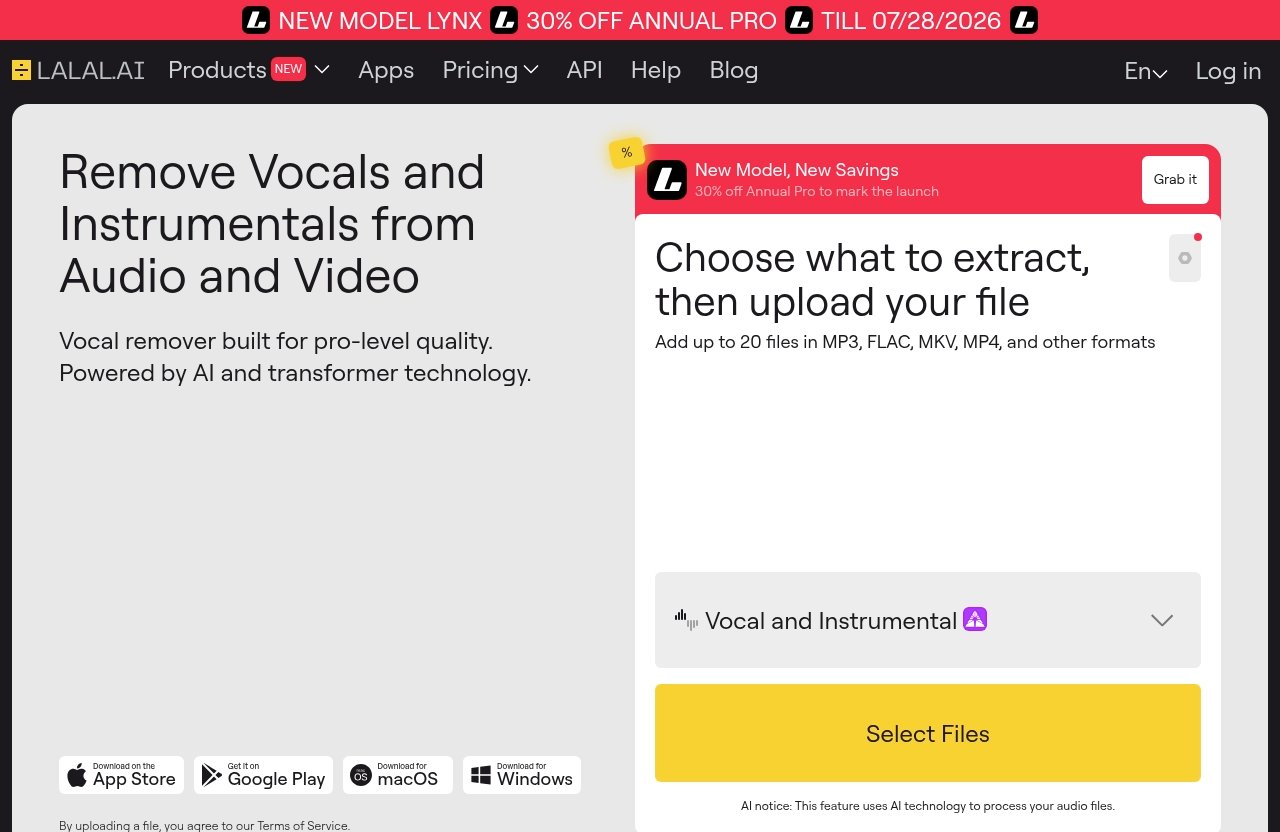
For LALAL.AI specifically, I only used the verified official facts provided: it is positioned as “Remove Vocals and Instrumentals from Audio and Video” and as a vocal remover built for pro-level quality, powered by AI and transformer technology.
Best overall pick for most users
LALAL.AI is my best overall pick among the best vocal remover tools because it covers the most common buyer needs: vocal removal, instrumental isolation, and stem splitting in a workflow that does not require technical setup.
It is especially attractive if you want one tool for music tracks, audio clips, and videos. Its official Vocal Remover is described as removing vocals and instrumentals from any music track, audio clip, or video, while its Stem Splitter can extract vocals, instrumental, drums, bass, guitar, synth, string, and wind instruments.
You can try it through LALAL.AI here if you want a practical starting point for pro-level vocal and stem separation.
Best free option
Ultimate Vocal Remover, often called UVR, is the best free option for technical users. It is popular in producer communities and often comes up in “best vocal remover Reddit” discussions because it gives more control than most browser-based tools.
The tradeoff is setup. It is not as beginner-friendly as an online instrumental isolator, and results depend heavily on the model, settings, and computer.
Best for advanced users
Ultimate Vocal Remover is the advanced-user pick, especially for people who like testing different models and settings. Hit’n’Mix is also worth considering if your goal is deeper audio manipulation rather than simple vocal removal.
For most non-technical buyers, though, the best vocal remover tools are the ones that produce usable results quickly. That is why LALAL.AI, Moises, and other streamlined tools can be better practical choices than a more complex desktop setup.
What Makes a Great Vocal Remover Tool?
Audio quality and artifact reduction
The most important factor is not whether a tool can remove vocals. Almost all of them can. The real question is whether the instrumental or acapella sounds clean enough to use.
When testing the best vocal remover tools, listen for vocal bleed, watery high frequencies, pumping, phase issues, and missing transients. A good result should preserve the musical feel of the track while reducing the target part as cleanly as possible.
You will usually hear more artifacts on songs with heavy reverb, layered harmonies, distortion, crowd noise, or vocals mixed tightly into synths and guitars. Clean studio recordings with centered lead vocals often separate better.
Stem separation options
A basic vocal remover usually creates two outputs: vocals and instrumental. That is enough for karaoke tracks, simple practice files, and quick acapella extraction.
A stem splitter goes further by separating parts such as drums, bass, guitar, synth, and other instruments. This matters for DJs, remixers, mashup creators, sample makers, and musicians who want to isolate specific parts.
If you are only making karaoke tracks, a simple vocal remover may be enough. If you want remix prep, drum loops, bassline study, or flexible editing, choose one of the best vocal remover tools with multi-stem output.
Online vs desktop software
The best vocal remover online is usually the easiest option. You upload a file, choose the separation type, wait for processing, and download the result.
Desktop software gives you more control and may be better if you process large batches or want local workflows. The downside is that setup, performance, and model management can be more complicated.
Online tools are usually better for beginners and creators who value speed. Desktop tools are better for advanced users who want control, privacy, or repeatable studio workflows.
Free vs paid limits
Searches for “best vocal remover tools free” are understandable, but free tools often have tradeoffs. They may limit file length, output quality, queue speed, batch processing, or available stem types.
Paid options tend to make more sense if you process music regularly or need cleaner output for client work, DJ sets, monetized content, or release-quality prep. Still, free tools are useful for testing whether a track separates well before committing money.
The smartest approach is to test a short section first. If the preview sounds promising, then process the full track with the tool that gives the cleanest export.
Best use cases: karaoke, remixing, practice, sampling
Different users need different results. A karaoke user mainly wants the lead vocal reduced without destroying the backing track. A remix producer may care more about extracting a usable acapella or drum stem.
Here is how I would match needs to tool types:
| Use case | Best tool type |
|---|---|
| Karaoke | Simple vocal remover or instrumental isolator |
| Remixing | Multi-stem AI stem splitter |
| Music practice | Vocal, bass, drums, or guitar isolation |
| Sampling | Stem splitter with clean exports |
| Video editing | Tool that supports audio and video inputs |
| Advanced restoration | Desktop or pro audio software |
The best vocal remover tools are not always the same for every use case. A fast karaoke track maker may not be the best choice for detailed remix production.
Best Vocal Remover Tools in 2026: 10 Top Picks
1. LALAL.AI
LALAL.AI is the best overall recommendation for buyers who want vocal removal and stem splitting without a complicated setup. Its official positioning is “Remove Vocals and Instrumentals from Audio and Video,” and it is described as a vocal remover built for pro-level quality, powered by AI and transformer technology.
It offers a Vocal Remover for removing vocals and instrumentals from music tracks, audio clips, or video. It also offers a Stem Splitter that can extract vocals, instrumental, drums, bass, guitar, synth, string, and wind instruments.
Pros
- Strong fit for vocal removal and instrumental isolation
- Stem Splitter supports multiple musical parts
- Works with officially mentioned inputs such as MP3, FLAC, MKV, MP4, and other formats
- Officially supports uploading up to 20 files
- Available through App Store app, Google Play app, macOS download, and Windows download
- Good option for buyers who want a simpler workflow than advanced desktop tools
Cons
- Pricing details should be checked on the official pricing page because no verified plan amounts were visible in the provided source
- Like every AI separator, results vary by track
- Users who want full manual control may prefer a technical desktop tool
Best for
DJs, remixers, karaoke creators, musicians, editors, and general users who want one of the best vocal remover tools for both simple vocal removal and multi-stem separation.
Short verdict
LALAL.AI is the best all-around pick for most buyers because it combines vocal removal, instrumental isolation, stem splitting, and cross-device access in a practical workflow.
2. Ultimate Vocal Remover (UVR)
Ultimate Vocal Remover, also known as UVR, is a popular choice for advanced users who want more control over separation models and settings. It is frequently mentioned in producer communities and “best vocal remover Reddit” threads because it can be very capable when configured well.
The downside is complexity. Beginners may find model choices, setup steps, and system requirements less approachable than a browser-based AI vocal remover.
Pros
- Strong advanced-user flexibility
- Often favored by technically confident producers
- Can be a serious option for people comparing the best vocal remover software for PC
- Useful if you like testing different models and workflows
Cons
- More setup effort than online tools
- Less beginner-friendly
- Results can vary based on model choice and settings
- Computer performance may affect the workflow
Best for
Advanced users, producers, and audio hobbyists who want control and do not mind experimentation.
Short verdict
UVR is the best free advanced option, but it is not the easiest choice for casual users who just want fast, clean results.
3. Moises
Moises is a polished music-practice and stem-separation platform that appeals to singers, musicians, students, and creators. It is especially useful when your goal is not just removing vocals but practicing with separated parts.
Compared with more technical tools, Moises is easier to approach. It is often a good fit for users who want a guided experience rather than a production-engineering workflow.
Pros
- Friendly interface for musicians and practice users
- Good for isolating parts for learning and rehearsal
- Useful for singers, instrumentalists, and content creators
- More approachable than advanced desktop tools
Cons
- May not offer the same control as UVR-style workflows
- Best results still depend on the source track
- Users should check current plan details before buying
Best for
Musicians, vocalists, students, and practice-focused users.
Short verdict
Moises is one of the best vocal remover tools for practice and learning, especially if you want a musician-friendly interface.
4. VocalRemover.org
VocalRemover.org is a simple browser-based option for quick vocal removal. It is the kind of tool many people try first when searching for the best vocal remover online.
Its main advantage is convenience. You do not need to understand stem models or download desktop software to create a basic instrumental or vocal output.
Pros
- Simple and easy to access
- Good for quick tests and casual karaoke prep
- No technical setup required
- Useful for beginners
Cons
- Less suitable for demanding professional work
- Feature depth may be limited compared with full stem splitters
- Output quality can vary noticeably by track
Best for
Casual users who want a fast online vocal remover for simple jobs.
Short verdict
VocalRemover.org is convenient for quick use, but serious remixers and producers may want a more advanced stem splitter.
5. DJ.Studio
DJ.Studio is best understood as a DJ-focused workflow tool rather than just a standalone vocal remover. It can be useful for DJs planning sets, transitions, edits, and remix-style arrangements.
For buyers comparing the best vocal remover tools, DJ.Studio is worth considering if vocal removal is part of a larger DJ preparation workflow. If all you need is a clean acapella or instrumental, a dedicated vocal remover may be more direct.
Pros
- Strong fit for DJ workflows
- Useful for set planning and creative arrangement
- Better for performance prep than casual karaoke
- Can support remix-minded workflows
Cons
- May be more tool than needed for simple vocal removal
- Buyers should verify current features and pricing on the official site
- Not the most direct choice for one-off stem extraction
Best for
DJs who want vocal removal as part of a broader mix-planning environment.
Short verdict
DJ.Studio is a good DJ workflow choice, but not the simplest pick if you only need isolated vocals or an instrumental.
6. LANDR
LANDR is widely known in the music creator space, especially for creator services around production and release workflows. Its vocal-removal or stem-related usefulness depends on what you need from the broader LANDR ecosystem.
For musicians already using LANDR, it may be convenient to keep more of the workflow in one place. For buyers focused only on the best vocal remover tools, a dedicated separator may be more efficient.
Pros
- Recognizable creator-focused platform
- Potentially convenient for users already in the LANDR ecosystem
- Good fit for music makers who use multiple production services
- More polished than many small one-purpose tools
Cons
- May not be the most specialized vocal remover option
- Buyers should confirm current feature availability and pricing
- Dedicated stem splitters may offer a more focused workflow
Best for
Music creators who want vocal removal alongside broader production services.
Short verdict
LANDR can be convenient for existing users, but dedicated tools may be better if vocal separation quality is your main buying factor.
7. Hit’n’Mix
Hit’n’Mix is aimed more at deep audio manipulation than casual vocal removal. It can appeal to users who want to interact with separated musical elements in a more detailed way.
This makes it interesting for producers, educators, and advanced editors. However, beginners looking for a simple karaoke track maker may find it more complex than necessary.
Pros
- Strong fit for detailed audio manipulation
- Interesting for producers and educators
- More advanced than basic browser tools
- Useful when you want to go beyond simple vocal removal
Cons
- Learning curve is higher than simple online tools
- May be excessive for casual users
- Buyers should verify current pricing and compatibility
Best for
Advanced editors, producers, educators, and users who want deeper control over separated audio.
Short verdict
Hit’n’Mix is a capable advanced option, but it is not the first tool I would suggest to a beginner comparing the best vocal remover tools.
8. Adobe Podcast or other voice-focused remover
Adobe Podcast and similar voice-focused tools are best for speech cleanup, dialogue enhancement, and podcast-style audio repair. They are not always the same category as a music stem splitter.
If your source is spoken-word audio, interviews, narration, or podcast content, a voice-focused remover or cleaner may be more relevant than a music vocal remover. For songs, choose a tool built specifically for vocals and instruments.
Pros
- Useful for speech, narration, and podcast cleanup
- Good fit for content creators and editors
- Often easier than music-production tools
- Can improve voice clarity in the right context
Cons
- Not always designed for music stem separation
- May not create proper karaoke or remix stems
- Feature names can be confusing across voice tools
Best for
Podcasters, video editors, educators, and creators working with speech rather than full songs.
Short verdict
Voice-focused tools are useful, but they are not direct replacements for the best vocal remover tools built for music separation.
9. Canva Vocal Remover
Canva Vocal Remover is aimed at creators who want fast, simple editing inside a design and content workflow. It makes sense for social clips, simple videos, and non-technical editing tasks.
Its appeal is convenience. If you are already creating short-form videos, presentations, or social content in Canva, a built-in vocal remover can reduce workflow friction.
Pros
- Beginner-friendly
- Convenient for creators already using Canva
- Good for quick social and video projects
- Simple workflow for non-technical users
Cons
- Not ideal for advanced audio production
- Limited control compared with dedicated tools
- Results still depend on track quality and mix complexity
Best for
Social media creators, marketers, educators, and casual editors.
Short verdict
Canva Vocal Remover is convenient for content workflows, but dedicated tools are usually better for serious stem quality.
10. SoundBoost AI
SoundBoost AI is another AI-based option for users exploring quick vocal removal and audio enhancement workflows. It may appeal to buyers who want a simple interface and do not need deep production controls.
As with many newer AI audio tools, buyers should test output carefully before committing. Separation quality can vary from song to song, and marketing pages do not always tell you how a tool will handle your exact track.
Pros
- Simple AI-based workflow
- Potentially useful for quick vocal removal tests
- Good for casual users who want an accessible tool
- Worth comparing against other browser-based options
Cons
- Buyers should verify current features and pricing directly
- May not match advanced tools for control
- Quality depends heavily on the source material
Best for
Casual users comparing browser-based AI vocal remover options.
Short verdict
SoundBoost AI is worth testing for simple jobs, but comparison shoppers should audition it against LALAL.AI, Moises, and UVR before deciding.
Why LALAL.AI Stands Out for Buyers
Pro-level quality positioning
LALAL.AI stands out because its official positioning is clear: it is a vocal remover built for pro-level quality, powered by AI and transformer technology. That matters because buyers are not just looking for a novelty tool; they want exports that can be used for karaoke, practice, remix prep, editing, or content creation.
In my experience reviewing audio tools, the best vocal remover tools are the ones that make the first result usable without forcing beginners to understand technical model settings. LALAL.AI fits that buyer profile well.
That does not mean every track will come out perfectly. No tool can guarantee flawless separation on every song, especially with dense arrangements or reverb-heavy vocals.
Vocal Remover and Stem Splitter workflow
The big advantage is that LALAL.AI is not limited to basic two-track vocal removal. Its official homepage lists Vocal Remover, Stem Splitter, Voice Cleaner, Voice Changer, Voice Cloner, Echo & Reverb Remover, and Lead/Back Splitter.
For the core use case, the Vocal Remover is described as removing vocals and instrumentals from any music track, audio clip, or video. The Stem Splitter is described as extracting vocals, instrumental, drums, bass, guitar, synth, string, and wind instruments.
That combination makes LALAL.AI useful whether you need an instrumental isolator, an acapella extractor, or a broader stem splitter.
Cross-device access
LALAL.AI also stands out because of its official platform options. The product has an App Store app, Google Play app, macOS download, and Windows download.
That makes it more flexible than tools that are only web-based or only desktop-based. For example, a DJ might prepare stems on a laptop, while a singer might test a track from a phone.
Officially supported inputs mentioned include MP3, FLAC, MKV, MP4, and other formats, with upload support for up to 20 files. That is useful for people who work with both audio and video sources.
Who should choose LALAL.AI
Choose LALAL.AI if you want one of the best vocal remover tools for a balanced mix of quality, ease, and stem options. It is especially suitable if you do not want to configure advanced open-source software but still need more than a basic free vocal remover.
It is a strong fit for:
- DJs preparing edits, mashups, and transitions
- Karaoke creators making instrumental versions
- Producers extracting acapellas or reference stems
- Musicians isolating parts for practice
- Content creators working with audio and video files
- Buyers who want web, desktop, and mobile access
For more detail on cost, see our internal guide: [How Much Does Lalal.AI Cost in 2026? Lalal.AI Pricing Guide](/how-much-does-lalal-ai-cost-in-2026-lalal-ai-pricing-guide/). Pricing details should always be checked on the official pricing page because verified plan amounts were not visible in the provided official pricing excerpt.
Official website · Latest pricing & offers
Best Vocal Remover Tools by Use Case
Best for DJs and remixers
For DJs and remixers, LALAL.AI is the best starting point because it offers both vocal removal and multi-stem splitting. Being able to extract vocals, instrumental, drums, bass, guitar, synth, string, and wind instruments gives you more creative options than a basic karaoke tool.
DJ.Studio is also worth considering if your workflow includes set planning and DJ arrangement. UVR is a strong option if you are comfortable with a more technical setup.
Best for karaoke creators
For karaoke creators, the best tool is the one that creates a clean instrumental while keeping the energy of the original track. LALAL.AI, VocalRemover.org, Moises, and Canva Vocal Remover can all be relevant depending on how polished the final file needs to be.
If you are making tracks for casual singing, a simple online tool may be enough. If you want better separation and broader format support, choose one of the best vocal remover tools with stronger AI separation and export flexibility.
Best for musicians practicing at home
Moises is a natural fit for musicians who want practice-oriented workflows. It can help singers, guitarists, bassists, and drummers focus on parts of a song while practicing.
LALAL.AI is also strong here because its Stem Splitter supports extracting multiple instruments. That makes it useful for learning basslines, drum parts, guitar sections, or vocal arrangements.
Best for content creators and editors
Content creators often need speed more than deep control. Canva Vocal Remover is convenient if you already work inside Canva, while voice-focused tools such as Adobe Podcast-style cleaners are better for spoken audio.
For music-based video, LALAL.AI is a better fit because it is officially positioned for removing vocals and instrumentals from audio and video. It supports officially mentioned inputs such as MP3, FLAC, MKV, MP4, and other formats.
Best for advanced users who want control
Ultimate Vocal Remover is the best advanced-user option because it gives technically confident users more room to experiment. Hit’n’Mix is another advanced choice for people who want deeper audio manipulation.
If you are comparing LALAL.AI with more professional repair software, read our guide: [Lalal.AI vs iZotope RX 11: Which Is Better in 2026?](/lalal-ai-vs-izotope-rx-11-which-is-better-in-2026/). The right choice depends on whether you need fast AI stem separation or broader audio repair and restoration tools.
How to Choose the Right Tool for Your Track
Song complexity and genre
The best vocal remover tools perform differently depending on the track. Sparse pop songs with centered lead vocals often separate better than dense rock, live recordings, metal, orchestral music, or tracks with heavy effects.
Listen carefully to the first 20–30 seconds of output before processing a full project. If the chorus has stacked harmonies, distorted guitars, or wide vocal effects, test that section too.
Need for instrumental-only versus multi-stem output
If you only want karaoke, choose a vocal remover or instrumental isolator. You do not necessarily need drum, bass, guitar, or synth stems.
If you are remixing, sampling, or studying arrangements, choose a stem splitter. Multi-stem output gives you more flexibility and often saves time later in your DAW or video editor.
File formats and upload limits
Format support matters more than buyers often realize. If you work with video files, look for a tool that handles video inputs, not just WAV or MP3.
For LALAL.AI, the officially mentioned supported inputs include MP3, FLAC, MKV, MP4, and other formats. The official facts also mention uploading up to 20 files, which can help if you process multiple tracks.
Privacy and offline requirements
If privacy is your main concern, offline desktop software may be more appealing. UVR can be attractive for users who prefer local processing and are comfortable with setup.
Online tools are more convenient, but they require uploading files. For unreleased music, client material, or confidential media, always review the tool’s current privacy terms before use.
Budget and recurring costs
Budget depends on how often you separate stems. A casual karaoke user may prefer a free or low-commitment tool, while a DJ or producer may get better value from a paid workflow.
Do not choose only by price. The cheapest result is not always the best value if you spend extra time cleaning artifacts, reprocessing files, or testing multiple tools.
Testing Notes: What to Expect from AI Stem Splitters
Why some songs separate better than others
AI stem splitters work by identifying patterns in audio. They do not have access to the original studio multitracks, so they are estimating which parts belong to vocals, drums, bass, and instruments.
That is why separation quality varies by song. A dry vocal over a simple beat may sound impressively clean, while a live band recording with room reverb may leave more bleed.
This is also why there is no single “vocal remover best quality” answer for every track. The best vocal remover tools reduce the odds of a bad result, but they cannot remove all uncertainty.
Common artifacts and how to minimize them
Common artifacts include watery vocals, muffled cymbals, ghost vocals in the instrumental, missing bass energy, and phasey high frequencies. These issues are normal with AI separation.
To improve results:
- Start with the highest-quality source file you have
- Avoid heavily compressed files when possible
- Test the loudest chorus, not just the intro
- Try both vocal and instrumental outputs
- Compare at least two tools for important projects
- Use EQ, noise reduction, or reverb carefully after separation
A better source file often matters as much as the tool. Low-bitrate audio gives the AI less information to work with.
When to try multiple tools on the same track
For important work, try more than one tool. I often test a short section in two or three separators before choosing the final export.
This is especially useful for remix prep, DJ edits, and client-facing content. One tool may create a cleaner acapella, while another may preserve the instrumental better.
If you want a simple starting order, test LALAL.AI first for ease and stem flexibility, UVR if you want advanced control, and Moises if your goal is practice or learning.
Pricing and Value Comparison
Freemium tools
Freemium tools are best for occasional users. They let you test whether vocal removal works for your track before paying.
However, free plans often come with practical limits. These may include file length, export quality, processing speed, available stems, or the number of tracks you can process.
If you are searching for the best vocal remover tools free, use free options for testing and casual use. For serious output, compare the paid tier or a more specialized tool.
Subscription tools
Subscription tools can be a good fit for creators who process stems every week. They are often convenient because you get ongoing access rather than buying credits track by track.
The downside is recurring cost. If you only need a few karaoke tracks, a subscription may not be the best value.
Always check the official pricing page before buying. Pricing and included features can change, especially as AI audio tools add new models.
One-time or credit-based pricing
Credit-based pricing can be attractive for occasional users because you pay around actual usage rather than keeping a subscription active. One-time desktop software can also make sense if you want local control.
For LALAL.AI, the provided official pricing excerpt mentions “NEW MODEL LYNX,” “30% OFF ANNUAL PRO,” “TILL 07/28/2026,” “Choose Your Plan,” and “Plans & Extras.” Because no actual price amounts were visible in the provided official pricing source, you should check the official pricing page for current details.
Which plan type fits each user
Here is a practical way to think about value:
| User type | Best pricing model |
|---|---|
| Casual karaoke user | Free, limited, or credit-based |
| Weekly creator | Subscription or larger usage plan |
| DJ/remixer | Paid AI separator with reliable stem options |
| Advanced hobbyist | Free/open-source desktop plus time investment |
| Professional editor | Tool chosen by output quality and workflow speed |
If separation quality saves you editing time, a paid tool can be worth it. If you only need one rough instrumental, a simple free tool may be enough.
Final Recommendation: Which Vocal Remover Should You Buy?
Best overall
LALAL.AI is the best overall recommendation among the best vocal remover tools in 2026. It is the strongest fit for most buyers because it combines a Vocal Remover, Stem Splitter, audio and video input support, and cross-device access.
It is especially easy to recommend for pro-level stem separation, karaoke creation, remix prep, and general vocal removal. You can evaluate it directly through LALAL.AI and compare the output on your own tracks.
Best budget choice
Ultimate Vocal Remover is the best budget choice for advanced users who are comfortable with setup and experimentation. It can be powerful, but it requires more patience than streamlined online tools.
For beginners looking for a quick free test, VocalRemover.org or a similar simple browser tool is easier. Just expect fewer controls and less predictable output on difficult songs.
Best advanced choice
Ultimate Vocal Remover is the best advanced choice if you want model control and do not mind a technical workflow. Hit’n’Mix is also worth considering if you want deeper manipulation of separated musical material.
Advanced does not always mean better for every buyer. If your main goal is fast, repeatable output, LALAL.AI may be the more practical choice.
Best for beginners
For beginners, LALAL.AI, Moises, and VocalRemover.org are the easiest places to start. LALAL.AI is the best beginner-to-pro option because it gives you room to grow from simple vocal removal into full stem splitting.
The final advice is simple: test your actual song. The best vocal remover tools can produce impressive results, but no AI stem splitter is perfect for every recording.
Official website · Latest pricing & offers
FAQ
What is the best tool to remove vocals?
The best tool depends on your track and what you want to do with the result. For most buyers, LALAL.AI is a strong recommendation because it offers vocal removal, instrumental isolation, and stem splitting in a simple workflow.
Advanced users may prefer Ultimate Vocal Remover for more control. Casual users may be fine with a free browser tool for quick karaoke tracks.
What is the best vocal remover 2026?
In 2026, LALAL.AI is the best overall choice for buyers who want pro-level quality positioning with an easier workflow. It is especially useful for vocal removal, instrumental isolation, and multi-stem separation.
Ultimate Vocal Remover remains a popular advanced option, especially among technical users and producer communities. The best choice depends on whether you value convenience or control.
What is the AI tool for removing vocals?
An AI tool for removing vocals uses machine learning to separate vocals from instrumental parts in a mixed audio file. Common examples include LALAL.AI, Ultimate Vocal Remover, Moises, VocalRemover.org, and other AI vocal remover platforms.
These tools can create vocal-only, instrumental-only, or multi-stem outputs depending on the product.
Can vocal remover tools create karaoke tracks?
Yes. Many vocal remover tools can create karaoke tracks by reducing or removing the lead vocal and exporting an instrumental version.
Results vary by song. Tracks with heavy reverb, backing vocals, or dense arrangements may still have some vocal bleed or artifacts.
Do vocal remover tools work on every song?
No. Vocal remover tools do not work perfectly on every song.
Results depend on genre, mix complexity, reverb, source quality, and how the vocal is blended into the instrumental. For important projects, test more than one tool and compare the outputs before choosing your final version.