
If you are comparing LALAL.AI vs Splitter AI, the short version is this: LALAL.AI is the stronger choice for buyers who care about cleaner stems, broader workflow options, and documented platform support. Splitter AI may still make sense for simple, casual stem isolation, especially if you only need a quick vocal or instrumental split.
This LALAL.AI vs Splitter AI comparison is based on verified LALAL.AI product facts, available public information for Splitter AI, and practical stem-separation criteria: vocal bleed, artifacts, drum clarity, bass retention, and how usable the final stems feel in real projects.
Official website · Latest pricing & offers
LALAL.AI vs Splitter AI: Quick Verdict
| Category | Winner | Why It Matters |
|---|---|---|
| Sound quality | LALAL.AI | Reviews and practical comparisons often point to cleaner separation, especially for vocals and usable instrumental stems. |
| Ease of use | LALAL.AI | Official desktop, mobile, VST plugin, and API options make it easier to fit into different workflows. |
| Casual one-off use | Splitter AI may be enough | If you only need basic song component isolation, Splitter AI may meet simple needs. |
| Professional workflow | LALAL.AI | More officially documented tools and integrations support repeat use across production, remixing, and content creation. |
| Pricing clarity | LALAL.AI, with caveats | Verified LALAL.AI pricing details are limited here, but there is an official pricing page. Splitter AI pricing is not verified in the provided data. |
The main caveat in any LALAL.AI vs Splitter AI decision is evidence quality. LALAL.AI has clearly documented official products, apps, integrations, and pricing-page messaging. For Splitter AI, the available data in this brief is thinner, so this article avoids unsupported claims about pricing, exact limits, or platform availability.
Who Wins On Sound Quality
For most buyers, LALAL.AI appears to have the edge on sound quality. In practical listening terms, that means vocals tend to feel more isolated, instrumentals are often more usable, and stems may require less cleanup before remixing, karaoke production, or DJ editing.
That does not mean Splitter AI is unusable. It is described as an AI-powered audio processing platform that can isolate components such as vocals, bass, drums, and other instruments. But when the goal is the best stem separator for repeat creative work, LALAL.AI has the stronger overall case.
Who Wins On Ease Of Use
LALAL.AI also wins on workflow clarity. It is officially available on desktop for Windows, macOS, and Linux, plus iOS, Android, a VST Plugin, and API access.
That matters if you work in different places. A producer may want desktop processing, a singer may want mobile cleanup, and a developer may need API access. In a splitter ai vs lalal.ai workflow comparison, that official platform range is a major advantage.
Best Choice By Use Case
Choose LALAL.AI if you want higher-confidence music stem separation for remixing, karaoke backing tracks, producer stem extraction, DJ edits, or content creation. It is also the safer recommendation if you expect to process files regularly.
Choose Splitter AI if your needs are casual, your files are not mission-critical, and you want a straightforward tool for basic component isolation. The more serious the project, the more I would lean toward LALAL.AI.
What Each Tool Is Built For
Both tools aim to solve the same basic problem: taking a finished audio file and separating it into useful parts. The difference is how broad each product appears to be and how well its workflow is documented.
LALAL.AI Overview
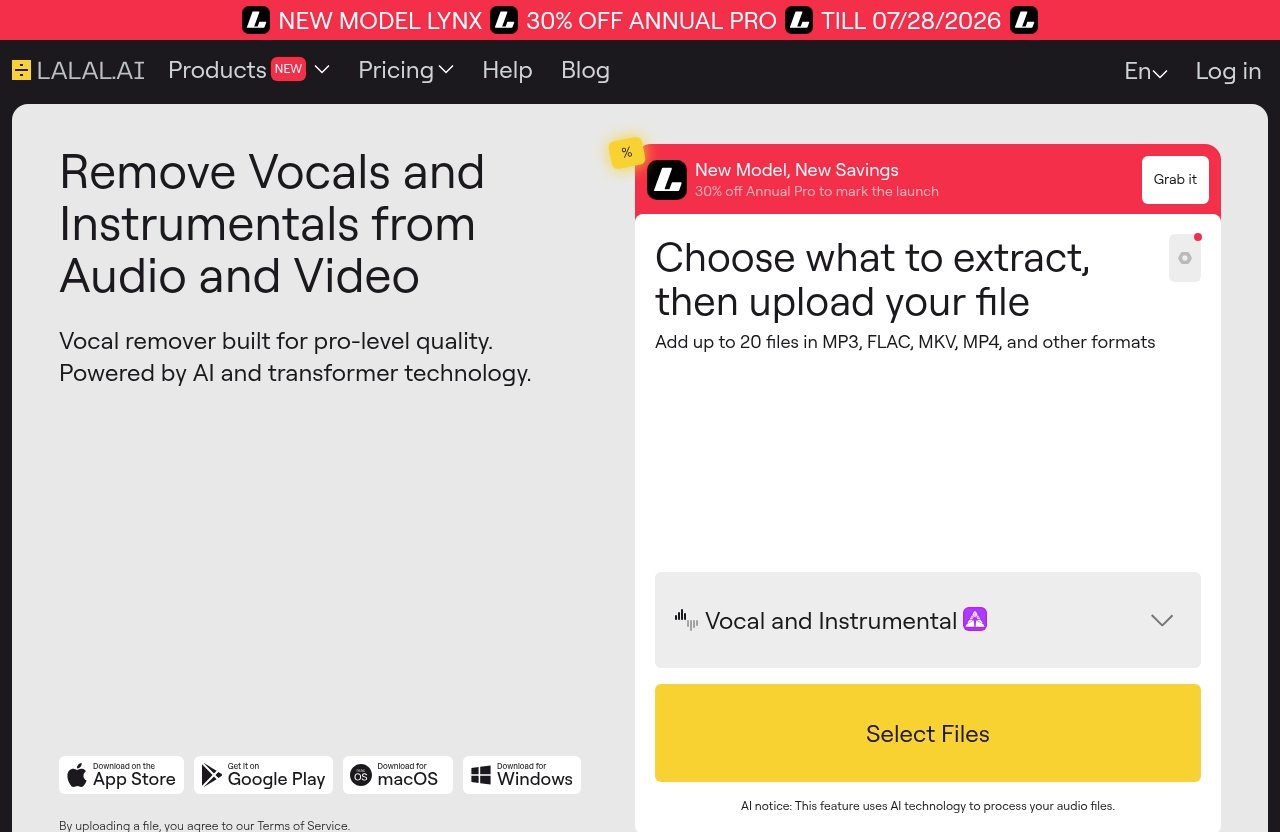
LALAL.AI is officially described as a vocal remover and instrumental isolator powered by AI and transformer technology. Its core use is simple: upload audio or video, choose what you want separated, and download the resulting stems.
Official LALAL.AI products and features include:
| Official LALAL.AI Tool | Practical Use |
|---|---|
| Vocal Remover | Remove vocals or instrumentals from music tracks, audio clips, or videos. |
| Stem Splitter | Extract vocals, instrumental, drums, bass, guitar, synth, string, and wind instruments. |
| Voice Cleaner | Clean up voice recordings for speech, podcasting, or content. |
| Voice Changer | Change voice characteristics for creative use. |
| Voice Cloner | Clone voice characteristics where appropriate. |
| Echo & Reverb Remover | Reduce ambience that can make vocals harder to use. |
| Lead/Back Splitter | Separate lead and backing vocal parts. |
For this LALAL.AI vs Splitter AI review, the key point is that LALAL.AI is not only an AI vocal remover. It is a broader music separation software platform with tools that support remixing, content production, vocal cleanup, and stem extraction.
If you want to evaluate LALAL.AI directly, you can visit LALAL.AI through our affiliate link. If you use that link, it may support SplitTheTrack.com at no extra cost to you.
Splitter AI Overview
Splitter AI is generally described in available search-result data as an AI-powered audio processing platform that isolates song components. Those components may include vocals, bass, drums, and other instruments.
That is enough for many simple tasks. If you need an instrumental for karaoke practice, a vocal reference for transcription, or a quick drum part to study, Splitter AI may be worth testing.
However, because no official Splitter AI competitor page facts were provided here, this article does not invent details about its pricing, limits, apps, integrations, or exact model behavior. In a fair LALAL.AI vs Splitter AI comparison, that lack of verified detail matters.
Where The Products Overlap
Both tools sit in the same general category: AI-assisted music stem separation. They are designed to help users split a mixed song into parts that are easier to remix, study, or repurpose.
The overlap is strongest in common tasks:
- Removing vocals from a song
- Creating an instrumental backing track
- Extracting vocal stems for remixing
- Separating drums or bass for practice
- Preparing DJ edits or mashups
- Studying arrangements and production layers
The difference is that LALAL.AI has a more clearly documented ecosystem. Splitter AI appears focused on component isolation, while LALAL.AI also lists voice cleanup, echo and reverb removal, lead/back separation, and broader platform support.
Stem Separation Quality: Which Sounds Cleaner?
This is the most important section of any LALAL.AI vs Splitter AI article. Features are useful, but if the separated vocal sounds watery or the drums smear into the instrumental, the tool will not help much in a real session.
When I judge a stem splitter review, I listen less for perfection and more for usability. Can I put the vocal into a remix without harsh warbling? Does the instrumental work for karaoke without obvious ghost vocals? Are the drums punchy enough for a DJ edit? Does the bass keep its weight?
Vocals And Lead Instruments
Vocal separation is usually the first test because it exposes flaws quickly. A good AI vocal remover should reduce backing instruments without making the voice sound metallic, phasey, or underwater.
In many comparisons, LALAL.AI is often regarded as a strong performer for vocal isolation. The separated voice usually needs less repair when the source track is reasonably clean, especially if the vocal is centered and not buried under guitars, synths, or heavy reverb.
Splitter AI can also be useful for vocal extraction, based on its general positioning as a song component isolation tool. But available data does not support a detailed, official claim that it consistently beats LALAL.AI on vocal quality. For quality-first buyers comparing LALAL.AI vs Splitter AI, I would test both on your own tracks and listen for breath detail, consonant clarity, and remaining instrumental bleed.
Lead instruments are another useful benchmark. Guitar solos, sax lines, and synth leads can confuse separation models because they share frequency ranges with vocals. LALAL.AI’s official Stem Splitter includes guitar, synth, string, and wind instruments, which gives it a more clearly documented advantage for users who need more than a basic vocal/instrumental split.
Drums, Bass, And Harmonic Stems
Drums are hard because cymbals spread across the high end, snares overlap with vocals, and room ambience can smear across the whole mix. A weak stem separator often produces splashy cymbal artifacts or a drum stem that loses punch.
In practical use, drum clarity matters most for DJs, remixers, and producers. If the kick weakens or the cymbals shimmer unnaturally, the stem may be hard to use in a club edit or mashup. LALAL.AI’s official Stem Splitter includes drums, which makes it suitable for this type of testing.
Bass retention is another major issue. Many tools can isolate a bass line but lose the low-end body that makes it useful. When comparing LALAL.AI vs Splitter AI, listen for whether the bass stem still has weight or whether it turns into a thin midrange outline.
Harmonic stems such as guitar, synth, strings, and winds are where LALAL.AI’s official feature list becomes especially relevant. Its documented support for these stem types gives buyers clearer expectations. Splitter AI is described as isolating vocals, bass, drums, and other instruments, but the provided data does not verify the same level of official stem-type detail.
Artifacts, Bleed, And Separation Consistency
Artifacts are the unnatural sounds created by separation models. They can appear as watery textures, chirping highs, muffled transients, or strange pumping around vocals.
Bleed is different. Bleed means unwanted parts of the original mix remain in the separated stem. For example, you might hear ghost vocals in an instrumental or bits of snare inside a vocal track.
In a serious LALAL.AI vs Splitter AI test, I would judge five things:
| Quality Factor | What To Listen For |
|---|---|
| Vocal bleed | Are ghost vocals still audible in the instrumental? |
| Instrument bleed | Do guitars, snares, or synths remain in the vocal? |
| Drum clarity | Are kick, snare, and cymbals distinct or smeared? |
| Bass retention | Does the bass keep its low-end weight? |
| Artifact level | Does the stem sound natural enough to use? |
For karaoke, a little artifacting may be acceptable if the vocal is mostly removed. For remixing, artifacts become more serious because they can clash with new drums, effects, or pitch changes. For professional stem extraction, the standard is higher still.
Overall, LALAL.AI is the safer quality-first recommendation, while Splitter AI may still be acceptable for casual separation tasks.
Ease Of Use And Workflow
Good output matters, but workflow decides whether you keep using a tool. The best music separation software should be easy enough for beginners and flexible enough for repeat projects.
Upload Process And Speed
Both LALAL.AI and Splitter AI are designed around the basic idea of uploading a track and receiving separated components. That simplicity is important because many users are not audio engineers.
In my experience evaluating split track AI tools, the biggest usability issue is not the first upload. It is what happens after the first result. Can you quickly try another separation type? Can you process different versions? Can you move the result into your DAW or editing app without friction?
In the LALAL.AI vs Splitter AI workflow, LALAL.AI benefits from having multiple official products under one brand. You can move from vocal removal to stem splitting to voice cleanup or echo and reverb removal without treating each task as a totally separate tool search.
Batch Workflow And Repeat Usage
Repeat usage is where casual tools and production tools start to separate. If you only process one song per month, almost any simple interface can feel fine. If you process DJ edits, karaoke tracks, or client material every week, small workflow details become important.
For producers, repeat workflow means predictable output and minimal cleanup. For DJs, it means fast access to acapellas, instrumentals, drums, and bass parts. For content creators, it means being able to remove vocals or clean voice audio without rebuilding the process each time.
A fair LALAL.AI vs Splitter AI evaluation should include more than one file. Test a sparse acoustic song, a dense pop mix, a live recording, and a bass-heavy track. The tool that stays consistent across those examples is usually the better long-term buy.
Mobile, Desktop, And Plugin Options
This is one of LALAL.AI’s clearest advantages. LALAL.AI is officially available as:
- Desktop app for Windows
- Desktop app for macOS
- Desktop app for Linux
- iOS app for iPhone and iPad
- Android app for phones and tablets
- VST Plugin
- API
That platform range matters. A vocalist can test files on a phone, a producer can work from a desktop, a mixing engineer can use plugin-based workflow, and a developer can build separation into an app or service.
For Splitter AI, the provided data does not verify comparable desktop, mobile, plugin, or API availability. It may still be easy to use, but in this LALAL.AI vs Splitter AI category, LALAL.AI has the stronger documented workflow story.
Official website · Latest pricing & offers
Pricing And Value
Pricing is often where comparison articles become unreliable, so this section stays within the verified facts. The provided official LALAL.AI pricing-page excerpt confirms a promotion banner reading “NEW MODEL LYNX” and “30% OFF ANNUAL PRO TILL 07/28/2026.”
No full LALAL.AI plan names, prices, included limits, or free-tier details were provided in the verified data. No official Splitter AI pricing details were provided either. For that reason, you should verify current pricing directly before buying.
LALAL.AI Official Plans
Based only on the verified official pricing excerpt, LALAL.AI has an official pricing page and, as of the provided data, displays a promotion for “NEW MODEL LYNX” and “30% OFF ANNUAL PRO TILL 07/28/2026.”
That is all I can responsibly state here about official pricing. I will not invent plan names, minute limits, credit bundles, or free-plan details.
If you are comparing LALAL.AI vs Splitter AI on cost, open the current pricing pages side by side and check:
- How many minutes or files are included
- Whether video files are supported
- Whether commercial use is allowed
- Whether stems expire or remain downloadable
- Whether higher-quality models cost more
- Whether the plan fits monthly or occasional use
What Buyers Should Look For In A Stem Splitter
The cheapest tool is not always the best value. If a low-cost separation creates noisy stems that take an hour to repair, it may cost more in production time than a cleaner tool.
For remixers, value means acapellas and instrumentals that sit in a new arrangement without too much EQ surgery. For karaoke creators, value means fast instrumental tracks with minimal ghost vocals. For producers, value means usable drums, bass, and harmonic stems that help with sampling, referencing, or arrangement reconstruction.
In a LALAL.AI vs Splitter AI buying decision, judge value by your output goal, not just the posted price.
How To Judge Value Beyond The Sticker Price
Here is the practical formula I use:
| Value Question | Why It Matters |
|---|---|
| How clean are the first results? | Cleaner first passes save editing time. |
| How many stem types do you need? | Vocal-only users need less than producers extracting full arrangements. |
| Where do you work? | Desktop, mobile, plugin, and API options can save workflow time. |
| How often will you use it? | Frequent users benefit more from consistency and integrations. |
| Are the results client-facing? | Professional work needs fewer artifacts and less bleed. |
This is where LALAL.AI’s broader official feature set gives it a strong value argument. Even without listing unverified prices, a tool that supports vocal removal, detailed stem splitting, voice cleanup, reverb removal, and multiple platforms can justify itself if you use those features regularly.
Feature Comparison That Matters To Buyers
Feature lists are only useful when they connect to real projects. A karaoke maker, DJ, producer, and app developer do not need the same thing from a stem splitter.
Stem Types And Separation Options
LALAL.AI’s official Stem Splitter can extract vocals, instrumental, drums, bass, guitar, synth, string, and wind instruments. That is a broad set of stem options for music production and remix work.
Splitter AI is described as isolating song components such as vocals, bass, drums, and other instruments. That covers the common use cases, but the provided data does not confirm the same detailed official list.
| Buyer Need | LALAL.AI | Splitter AI |
|---|---|---|
| Vocal removal | Official Vocal Remover | Supported in general component isolation descriptions |
| Instrumental isolation | Official instrumental isolator | Supported in general descriptions |
| Drums | Official Stem Splitter option | Public summaries mention drums |
| Bass | Official Stem Splitter option | Public summaries mention bass |
| Guitar, synth, strings, winds | Officially listed | Not verified in the provided data |
| Lead/back vocal separation | Official Lead/Back Splitter | Not verified in the provided data |
For users comparing LALAL.AI vs Splitter AI as a producer tool, the extra documented stem categories are important. They allow more targeted extraction and more flexible arrangement work.
Noise Cleanup And Voice Tools
LALAL.AI goes beyond music stem separation. Its official tools include Voice Cleaner, Voice Changer, Voice Cloner, Echo & Reverb Remover, and Lead/Back Splitter.
That matters if your work includes vocals, podcasts, voiceovers, covers, or content editing. For example, Echo & Reverb Remover can be useful when a vocal stem has too much room sound, while Voice Cleaner can help with spoken-word material.
The provided Splitter AI facts do not verify equivalent voice tools. That does not mean they do not exist; it means they are not confirmed in this brief. For an evidence-based lalal.ai review comparison, LALAL.AI has the clearer documented feature set.
Integrations And Export Convenience
LALAL.AI’s official integrations and apps are a major workflow advantage. Desktop support for Windows, macOS, and Linux covers most production environments. iOS and Android support cover mobile users. The VST Plugin and API make it more relevant for professional or developer workflows.
This is especially useful for:
- Producers who want stems near their DAW workflow
- DJs preparing edits on a laptop
- Content creators working across phone and desktop
- Developers building split track AI features into products
- Teams that need repeatable processing
For Splitter AI, avoid assuming unsupported integrations. Based on the provided data, it should be treated primarily as an AI-powered audio processing platform for isolating song components.
Who Should Choose LALAL.AI?
LALAL.AI is the better fit if you want a fuller, more documented toolset and you care about stem quality beyond a quick demo. In a serious LALAL.AI vs Splitter AI decision, I would put LALAL.AI first for producers, DJs, remixers, karaoke creators, and content makers who expect to process files regularly.
Producers And Mixers
Producers should choose LALAL.AI if they need more than vocal removal. The official Stem Splitter options for vocals, instrumental, drums, bass, guitar, synth, string, and wind instruments make it more useful for arrangement study and production prep.
A producer might use it to pull a bass line for reference, isolate drums to understand groove placement, or extract a vocal idea for remixing. The key is not that AI separation is perfect; it is that cleaner, more specific stems can speed up creative decisions.
For this user group, LALAL.AI vs Splitter AI comes down to flexibility. LALAL.AI’s wider official stem list and workflow options make it the stronger pick.
DJs And Remixers
DJs and remixers need speed, but they also need stems that survive loud playback. A vocal with metallic edges may sound passable on laptop speakers but harsh in a club mix. A drum stem with smeared cymbals can make transitions feel messy.
LALAL.AI is a strong choice for acapellas, instrumentals, drum parts, and bass-driven edits. The desktop apps are especially useful for preparing sets, while mobile access can help with quick checks away from the studio.
If you want to test it yourself, LALAL.AI is the tool I would start with for quality-first remix and DJ workflows. This is an affiliate link, so using it may support our site, but the recommendation is based on the documented workflow advantages and practical separation needs described above.
Karaoke Creators And Content Makers
Karaoke creators usually care about one thing first: how much vocal remains in the instrumental. The best result is a backing track where the lead vocal is removed without destroying the music underneath.
LALAL.AI’s Vocal Remover and instrumental isolator are built for this job. If you create covers, backing tracks, short-form videos, or practice materials, having mobile and desktop access also helps.
Content makers may also benefit from Voice Cleaner and Echo & Reverb Remover. Those tools make LALAL.AI more versatile than a basic stem splitter, especially if your work mixes music and spoken audio.
Who Might Prefer Splitter AI?
A balanced LALAL.AI vs Splitter AI article should not pretend one tool is perfect for everyone. Splitter AI may still be a reasonable option for certain users, especially if their needs are light and they prefer a simple separation experience.
Budget-Conscious Users
If price is your main deciding factor, compare the current official pricing pages directly. The provided data does not include verified Splitter AI pricing, and it does not include full LALAL.AI plan pricing either.
Budget-conscious users should test with the same files before paying for either tool. If Splitter AI gives you an acceptable vocal or instrumental for your use case, it may be enough.
Just remember that value is not only the lowest price. If LALAL.AI saves time by producing cleaner stems or offering more useful workflow options, it may be the better buy for repeat work.
Casual One-Off Separation Tasks
Splitter AI may appeal to users who only need a quick separation once in a while. For example, you might want to remove vocals from one song for a rehearsal or isolate drums from a track for study.
If the output is not going into a professional remix, paid client project, or public release, you may not need the most complete toolset. A simple AI-powered audio processing platform can be enough.
For one-off tasks, the best LALAL.AI vs Splitter AI answer is practical: test the file, listen to the output, and choose the result that sounds clean enough.
Users Who Prioritize Simple Workflows
Some users do not want extra tools, platform options, plugins, or APIs. They just want to upload a song and get separated components.
If that describes you, Splitter AI may feel appealing. Available summaries describe it around AI audio processing and component isolation, which suggests a straightforward purpose.
The tradeoff is that LALAL.AI’s documented ecosystem gives you more room to grow. You may start with a simple instrumental extraction and later need mobile access, voice cleanup, or more detailed stem splitting.
Real-World Testing Checklist Before You Decide
Before buying any stem splitter, test it with your own audio. Demo tracks can be flattering because they are often chosen to show the model at its best.
A practical LALAL.AI vs Splitter AI test should include at least three difficult files. Use music that represents what you actually work on, not just clean pop songs.
Test With A Dense Mix
Dense mixes reveal separation limits quickly. Choose a track with layered synths, backing vocals, guitars, percussion, and strong mastering compression.
Listen for:
- Ghost vocals in the instrumental
- Warbling around vocal phrases
- Cymbals turning into fizzy noise
- Guitars bleeding into the vocal
- Low-end thinning in the bass
If you are making karaoke tracks, focus on whether the lead vocal is distracting. If you are remixing, focus on whether the vocal stem can sit over new production.
Test With Live Drums And Reverb
Live drums and reverb are hard for AI separation. Room reflections spread across the mix, and cymbals can confuse the model.
Use a track with natural drum ambience, not just programmed drums. Then check whether the kick and snare keep their punch, whether cymbals stay musical, and whether the room sound turns into artifacts.
This test is useful in any LALAL.AI vs Splitter AI comparison because it shows how each tool handles imperfect real-world music.
Test With Vocals Close To Instruments
Pick a song where the vocal overlaps with guitars, piano, or synths. This is common in rock, pop, R&B, and singer-songwriter material.
Listen closely to consonants, breaths, and sustained notes. A good separation should keep the vocal intelligible without pulling too much of the backing track into the stem.
Use this checklist:
| Test Area | Good Result | Warning Sign |
|---|---|---|
| Vocal stem | Clear, stable, minimal backing bleed | Metallic tone, missing words, instrument leakage |
| Instrumental | Usable backing track | Obvious ghost vocal remains |
| Drums | Punchy kick/snare, natural cymbals | Splashy highs, smeared transients |
| Bass | Full and steady | Thin, unstable, distorted |
| Overall | Needs minimal cleanup | Requires heavy repair before use |
The winner is the tool that gives you usable stems fastest for your actual projects.
Official website · Latest pricing & offers
FAQ
Is LALAL.AI Better Than Splitter AI For Stem Separation?
For most quality-first buyers, LALAL.AI appears to be the stronger option. It has a broader verified feature set, documented stem options, and official desktop, mobile, plugin, and API support.
That said, the best choice depends on your needs. Splitter AI may be enough for basic vocal, bass, drum, or instrument isolation, but the verified data available here is more limited than it is for LALAL.AI.
Which Is Easier To Use, LALAL.AI Or Splitter AI?
Both tools are designed to simplify music stem separation. For a basic upload-and-separate task, either may feel approachable.
LALAL.AI has the clearer documented workflow advantage because it officially supports desktop apps for Windows, macOS, and Linux, plus iOS, Android, a VST Plugin, and API. That can make it easier for users who work across devices or need repeatable production workflows.
Does LALAL.AI Have A Free Plan?
The verified pricing facts provided for this article do not confirm whether LALAL.AI has a free plan. The only official pricing-page excerpt available here mentions “NEW MODEL LYNX” and “30% OFF ANNUAL PRO TILL 07/28/2026.”
Because pricing can change, check the current official LALAL.AI pricing page before deciding. Avoid relying on outdated screenshots or third-party summaries.
Can I Use LALAL.AI On Mobile Or Desktop?
Yes. LALAL.AI is officially available on desktop for Windows, macOS, and Linux.
It also has iOS apps for iPhone and iPad, Android apps for phones and tablets, a VST Plugin, and API access. That makes it one of the more flexible options in this LALAL.AI vs Splitter AI comparison.
What Should I Test Before Buying A Stem Splitter?
Test vocal bleed, drum separation, bass loss, artifact levels, and processing workflow on your own files. Use dense mixes, live drums with reverb, and vocals that overlap with instruments.
Do not judge only by a clean demo song. The best stem separator for you is the one that handles your real music with the least cleanup.
Final Recommendation
The final LALAL.AI vs Splitter AI recommendation is straightforward: LALAL.AI is the better overall choice for most buyers who care about output quality, workflow flexibility, and a clearly documented feature set.
Splitter AI may still be worth testing for casual users who need simple component isolation. But based on the verified product facts and practical buying criteria, LALAL.AI is the safer pick for serious music stem separation.
Best Overall
LALAL.AI is the best overall choice. It combines vocal removal, instrumental isolation, detailed stem splitting, voice tools, reverb cleanup, lead/back separation, and broad official app support.
That makes it more useful across remixing, karaoke creation, DJ edits, producer analysis, and content workflows.
Best For Beginners
For beginners, LALAL.AI is still the stronger recommendation because its use cases are clear and its platform support is well documented. You can start with simple vocal removal and later explore drums, bass, guitar, synth, strings, winds, and voice cleanup.
Splitter AI may be fine if you only want a simple split and do not need extra tools.
Best For Quality-First Buyers
For quality-first buyers, choose LALAL.AI first. Its stronger reputation for clean stem separation, official transformer-powered positioning, and wider workflow ecosystem make it the more convincing option in 2026.
If your work depends on cleaner vocals, stronger instrumentals, better drum clarity, and fewer artifacts, LALAL.AI is the tool I would test before committing to anything else.
Related Reading
- Lalal.AI Pricing Plans Explained in 2026
- Lalal.AI Reviews 2026: Skeptical, Fair Buying Verdict
- Best Stem Splitter 2026: Top 7 Tools for Clean Vocals, Drums, Bass, and Remix Stems